
|
Do it yourself
| |||
| ||||


How to reset the tire pressure monitor in the Honda Civic
Model: Honda Civic
MK 8
- Years 2006-2012
To reset the tire pressure light on the Honda Civic, follow these steps: ### 1. **Check tire pressure** - Before proceeding with the reset, make sure all tires are inflated to the correct pressure specified in the vehicle manual or on the sticker located inside the driver's door. ### 2. **Turn on the instrument panel** - Turn the key to the "ON" position without starting the engine (or press the ignition button without pressing the brake pedal, if your vehicle has keyless ignition). ### 3. **Navigate to the dashboard menu** - Use the buttons on the steering wheel to access the multifunction display (MID) menu. Look for the "Settings" or "Vehicle Settings" option. ### 4. **Find the TPMS Calibration option** - In the settings menu, look for "TPMS Calibration" or a similar option related to the tire pressure monitoring system. ### 5. **Start calibration** - Select the option to start calibration. The TPMS light may briefly flash and then turn off, indicating that calibration has started. ### 6. **Drive the vehicle** - After starting calibration, drive the vehicle for a few minutes at a speed above 25 km/h. The system will complete the calibration automatically and the light will turn off. ### 7. **Final check** - If the light does not turn off after following these steps, repeat the procedure. If it persists, there may be an issue with the TPMS system or one of the tire sensors, and it would be advisable to have the vehicle checked by a mechanic. This procedure may vary slightly depending on the year and model of your Honda Civic, but these steps should work for most recent models.
Posted on 8 March 2025 by ScegliAuto
Video tutorial
Related tutorials
Honda Civic
(2016-2021 /
MK 10)
To reset the tire pressure warning light on the Honda Civic, you need to inflate the tires until they reach the correct inflation pressure value: thi…

Honda Civic
(2006-2012 /
MK 8)
To make the tire pressure warning light on the Honda Civic disappear, you need to inflate the tires to the pressure value indicated on the sticker at…

Honda Civic
(2016-2021 /
MK 10)
Today we will see how to reset the tire pressure warning light on a 2017 Honda Civic LX model. Make sure all the vehicle doors are closed and that th…
Other guides you may be interested in
|
Frequently Asked QuestionsHow to Remove the Headrests from a Fiat Panda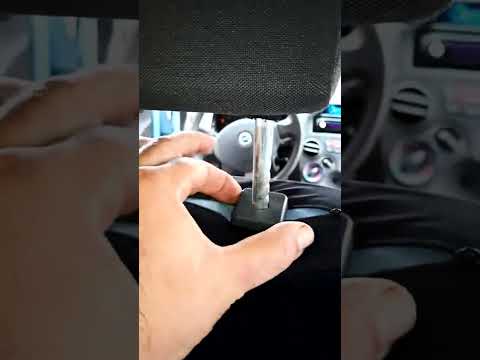
Below are the instructions to remove the headrests, both front and rear, from the Fiat Panda. First, get inside the vehicle and press and hold the side button located at the base of the headrest. Then, while holding the button, pull the headrest upwards to remove it, as shown in the video. At this point, perform the same operation on the other headrests. Now, simply insert them back in while holding the button, and finally adjust the height of all the headrests! by ScegliAuto More videos
|
|
For advertising on this site Write to info@scegliauto.com
ScegliAuto is not responsible for any inaccuracy of the data in the lists. To report any inaccuracy or your business (if you own the business in question), please write to info@scegliauto.com
Number of seconds to generate the page: 0.141
(c) ScegliAuto 2026 - info@scegliauto.com - Privacy policy VAT number: IT01247470535 |
