
|
Do it yourself
| |||
| ||||



How to Navigate the Speedometer of the Hyundai IX35
Model: Hyundai ix35
MK 1
- Years:
2009, 2010, 2011, 2012, 2013, 2014, 2015
Video tutorial
In this video, you will see how to navigate the display of the speedometer on the Hyundai IX35, and what information you can find by scrolling through the various data. To navigate the display, use the "trip" button located on the left side of the steering wheel; pressing it will show information regarding the current distance of trip A and trip B, estimated distance for the next fuel refill, average fuel consumption, and immediate fuel consumption; pressing again will display the average speed and trip time. Here you return to the main menu, and these are all the data you can obtain from the display.
Updated on 20 September 2026 by ScegliAuto
Related tutorials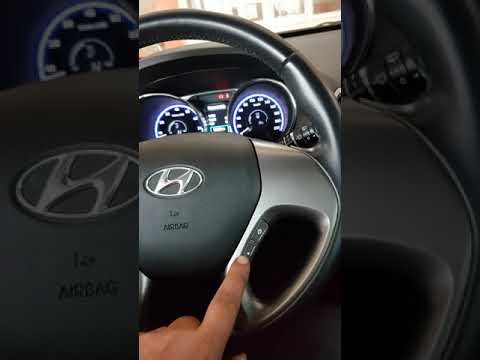
Hyundai ix35
(2009-2015 /
MK 1)
To reset the Service light on a Hyundai Ix35, turn on the ignition and press the upper button on the right side of the steering wheel, followed by th…

Hyundai ix35
(2009-2015 /
MK 1)
Before you start, open the bonnet of your Hyundai IX35. Begin by unclipping and moving the clips that secure the top cover of the air filter. Next, u…

Hyundai ix35
(2009-2015 /
MK 1)
To remove and subsequently replace the external wing mirror on a Hyundai Ix35, simply leverage it from behind with your hands, pulling it out of its …
Other guides you may be interested in
|
How to Set the Time in an Audi A4?
In this tutorial, you will see how to set the time in an Audi A4, a very simple and quick operation to perform after replacing the battery or when the time changes. First, insert the key and turn on the instrument cluster. Then, press the "SETUP" button located on the center console. Next, press the upper left arrow button, navigate to the "Time" option, and use the central knob to adjust the clock. Finally, set any necessary formats and save by returning to the main screen. by ScegliAuto More videos
|
|
For advertising on this site Write to info@scegliauto.com
ScegliAuto is not responsible for any inaccuracy of the data in the lists. To report any inaccuracy or your business (if you own the business in question), please write to info@scegliauto.com
Number of seconds to generate the page: 0.018
(c) ScegliAuto 2026 - info@scegliauto.com - Privacy policy VAT number: IT01247470535 |
