
|
Do it yourself
| |||
| ||||


How do you set the time on the Iveco Daily 2021?
Model: IVECO Daily
MK 5
- Years 2014-2026
Leaving aside the reasons why it is necessary to set the time, let's move on to describe how to do it independently, since it is not a complicated operation: Turn on the instrument panel, press the Mode button, located at the bottom of the dashboard, to the right of the steering wheel, and access the Settings, then choose the Date and Time option and set the Hours and then the minutes with the arrow keys. Everything done must be saved by pressing the Mode button again. To ensure the success of the operation, turn off and on the aforementioned panel.
Posted on 7 November 2024 by ScegliAuto
Video tutorial
Related tutorials
IVECO Daily
(2014-2026 /
MK 5)
Here is a video presentation of the Iveco Daily, one of the largest commercial transport vehicles in circulation. Do you need to restore the correct …
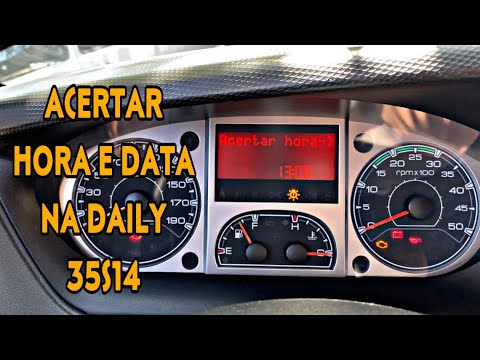
IVECO Daily
Here’s how to set the date and time on the Iveco Daily. First, press the mode button on the panel to the left of the steering wheel, then use the arr…

IVECO Daily
(2014-2026 /
MK 5)
Today, we will see in this video tutorial how to change the date and time on the Iveco Daily. First, get into the vehicle and turn on the instrument …
Other guides you may be interested in
|
How to Remove the Airbag from Citroen C3
To remove the airbag from a Citroen C3, follow these steps, which you can also see in the attached video. Check the warning light: before proceeding, ensure that the airbag warning light is off and that the horn functions correctly. Disconnect the battery: disconnect the battery to ensure safety during the operation. Locate the holes behind the steering wheel: find the two holes located behind the steering wheel. Insert a long screwdriver: insert a long screwdriver into the holes and press firmly to unlock the internal clips. Remove the airbag: at this point, you can remove the airbag from the steering wheel and disconnect the two internal connectors. by ScegliAuto More videos
|

|
For advertising on this site Write to info@scegliauto.com
ScegliAuto is not responsible for any inaccuracy of the data in the lists. To report any inaccuracy or your business (if you own the business in question), please write to info@scegliauto.com
Number of seconds to generate the page: 1.067
(c) ScegliAuto 2026 - info@scegliauto.com - Privacy policy VAT number: IT01247470535 |
