
|
Do it yourself
| |||
| ||||


How to restore the 8" or 12.3" multimedia screen of a Kia car
Model: Kia KIA Various
In this video we can see how to reset the multimedia screen of a Lia car, whether it is the 8" screen or the 12.3" screen. Like in any computer, when an error occurs, a reset may be needed. Now, using the Kia pen, we go near the volume knob, where we find the tiny reset button, which we can access using the specific pen. We will press it for about 10 seconds, and we will see a timer on the dedicated application on our smartphone. This system does not delete anything, it just performs a hard reset. On the 8" screen, the reset button is not in the same place; it is located on the side, above the tuning knob, but the system will be exactly the same. This will be enough to bring everything back to normal.
Posted on 13 August 2024 by ScegliAuto
Video tutorial
Related tutorials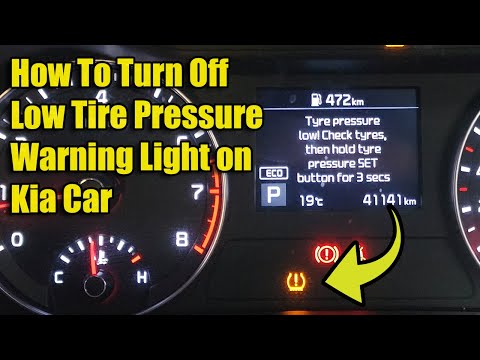
Kia KIA Various
When the yellow exclamation mark warning light illuminates on this car model, you need to check the actual tyre pressures and restore them to the man…

Kia KIA Various
To manually change the time displayed on your 2016 Kia Sedona, follow these simple steps outlined in this mini guide. First, insert the key and turn …

Kia KIA Various
In this short and simple guide, you will find instructions to reset the maintenance light for the engine oil change on the Kia K5. First, get inside …
Other guides you may be interested in |
How to Open the Bonnet on the Lancia Y
To open the bonnet on this vehicle, follow these simple instructions: first, open the driver's door and locate the lever positioned just below the dashboard, marked with an image of the vehicle with the bonnet open. Pull this lever towards you until you hear a "click" indicating the bonnet is released. Next, exit the cabin and stand in front of the bonnet to disengage the safety catch and complete the opening. To do this, slightly lift the bonnet, locate the yellow lever underneath, and pull it to the left to fully release and open the bonnet. by ScegliAuto More videos
|
|
For advertising on this site Write to info@scegliauto.com
ScegliAuto is not responsible for any inaccuracy of the data in the lists. To report any inaccuracy or your business (if you own the business in question), please write to info@scegliauto.com
Number of seconds to generate the page: 0.695
(c) ScegliAuto 2026 - info@scegliauto.com - Privacy policy VAT number: IT01247470535 |
