
|
Do it yourself
| |||
| ||||


This video is currently unavailable
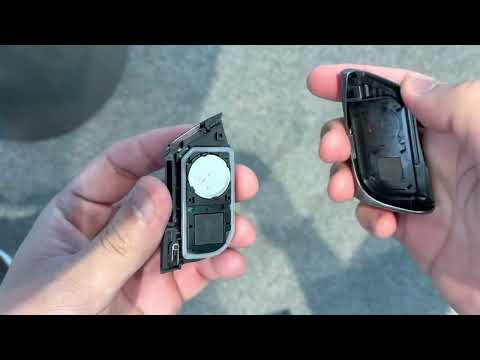
If the smart key of your Lexus LC has suddenly stopped working and you want to replace the battery yourself, follow these instructions to complete the operation correctly. First, press and hold the button on the side of the cover while simultaneously sliding the physical emergency key out downwards. Next, remove the rear cover using a flat screwdriver and take off the protective cap of the battery compartment. Finally, replace the old battery with a new one.
Updated on 15 August 2026 by ScegliAuto
Related tutorials
Lexus LC
(2018-2026 /
Z100)
To replace the small battery inside your Lexus LC500 key by yourself, simply follow the procedure described in our new guide. First, make sure you ha…

Lexus LC
(2018-2026 /
Z100)
Today we will explain how to replace the battery of the remote control for a Lexus LC car. To perform these steps, we need to press the PUSH button, …
Lexus LC
(2018-2026 /
Z100)
In this new guide regarding the Lexus LC500, we will discover how to quickly and safely replace the button cell battery inside the key. It will only …
Other guides you may be interested in
|
How to Reset the Tyre Pressure Warning Light on the Jeep Renegade?
To reset the tyre pressure warning light on the Jeep Renegade, inflate the tyres until they reach the recommended pressure: this value is indicated on the sticker attached to the driver’s door pillar. Once the tyres are properly inflated, navigate through the menu that appears on the instrument cluster until you find the tyre pressure option. At this point, press and hold the OK button on the right side of the steering wheel to make the warning light disappear. by ScegliAuto More videos
|
|
For advertising on this site Write to info@scegliauto.com
ScegliAuto is not responsible for any inaccuracy of the data in the lists. To report any inaccuracy or your business (if you own the business in question), please write to info@scegliauto.com
Number of seconds to generate the page: 0.106
(c) ScegliAuto 2026 - info@scegliauto.com - Privacy policy VAT number: IT01247470535 |
