
|
Do it yourself
| |||
| ||||


How to adjust the time in the Maxus Deliver 9 van?
Model: Maxus Maxus Various
In this tutorial we can see how to adjust the time in the Maxus Deliver 9 van, an extremely simple and fast operation, to be carried out for example after disconnecting the battery or following the switch to daylight saving time. First of all, let's go inside the cabin, then insert the key and turn on the instrument panel. Next, we reach the general menu on the touchscreen display, enter "System Settings", "General", "Time", and adjust the time as needed. To save the setting, just select "OK" and return to the main screen.
Posted on 1 February 2025 by ScegliAuto
Video tutorial
Related tutorials
Maxus Maxus Various
If the AdBlue warning light in the instrument panel of our Maxus Deliver 9 van has turned on, it means that the pollution control system liquid has r…

Maxus Maxus Various
To manually set the time displayed in the system of your Maxus LDV Deliver 9, follow these instructions. First, enter the vehicle and ensure all door…

Maxus Maxus Various
If you want to manually change the time displayed on the dashboard of your Maxus Deliver 3, follow these instructions. First, turn on the instrument …
Other guides you may be interested in
|
How to Open the Fuel Filler Cap of the 2020 Hyundai Tucson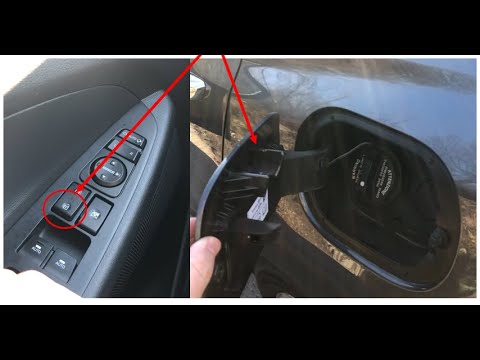
The 2020 Hyundai Tucson has two methods for opening the fuel filler flap. Both methods can only be used if the key has been removed from the ignition and the engine is off. The first method involves removing the key from the ignition and keeping all the car locks open, then go to the flap and press it. This will open the flap. The second method is to stay in the car, remove the key from the ignition, and then press the fuel filler release button located on the left door. by ScegliAuto More videos
|
|
For advertising on this site Write to info@scegliauto.com
ScegliAuto is not responsible for any inaccuracy of the data in the lists. To report any inaccuracy or your business (if you own the business in question), please write to info@scegliauto.com
Number of seconds to generate the page: 0.534
(c) ScegliAuto 2026 - info@scegliauto.com - Privacy policy VAT number: IT01247470535 |
