
|
Do it yourself
| |||
| ||||


How to reset the service of the Mercedes C-Class
Model: Mercedes Classe C
W203
- Years:
2000, 2001, 2002, 2003, 2004, 2005, 2006, 2007
Video tutorial
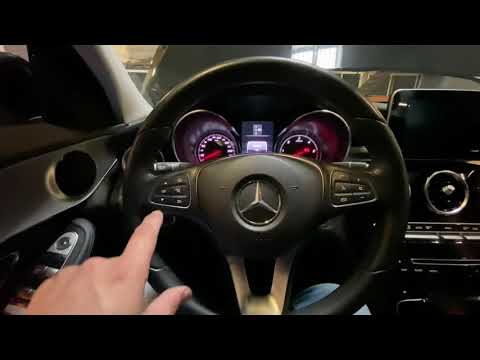
The following steps will illustrate how to reset the maintenance service warning of the Mercedes C-Class. First, get into the car and start the instrument panel; then press and hold the left button of the panel, waiting for the service confirmation voice that appears on the instrument panel display, as shown in the video. At this point, confirm and reset the service by pressing the appropriate button, thus resetting the maintenance key and the kilometers remaining before the next service!
Posted on 3 September 2025 by ScegliAuto
Related tutorials
Mercedes Classe C
(2007-2013 /
W204)
.. how to reset the service light on a Mercedes C-Class, a very simple and quick operation to perform only after completing all scheduled maintenance tasks... …
Mercedes Classe C
(2014-2021 /
W205)
.. To reset the service light on a Mercedes-Benz C-Class, follow these steps: Turn on the vehicle and ensure all doors are closed. Access the main menu.. …

Mercedes Classe C
(2007-2013 /
W204)
.. to reset the service light on a Mercedes-Benz C-Class, a very simple and quick operation to perform only after completing all scheduled maintenance tasks... …
Other guides you may be interested in
|
Where to Find and How to Remove the Spare Wheel of a Peugeot 5008?
The spare wheel of a Peugeot 5008 is located under the rear of the vehicle. To remove it, you need to lift the third row of seats to access the fixing bolt that holds the spare wheel in position. Using the correct spanner, proceed to unscrew the fixing bolt until the wheel is no longer secured. At this point, you can extract the spare wheel from underneath the vehicle. Once you have completed this step, you are free to fit the spare wheel. Ensure you correctly remount the spare wheel and securely tighten the fixing bolt when you are finished. by ScegliAuto More videos
|
|
For advertising on this site Write to info@scegliauto.com
ScegliAuto is not responsible for any inaccuracy of the data in the lists. To report any inaccuracy or your business (if you own the business in question), please write to info@scegliauto.com
Number of seconds to generate the page: 0.208
(c) ScegliAuto 2026 - info@scegliauto.com - Privacy policy VAT number: IT01247470535 |
