
|
Do it yourself
| |||
| ||||


How to Reset the Service Light on a 2022 Mercedes GLC
Model: Mercedes Glc
C253, X253, MK 1
- Years 2015-2022
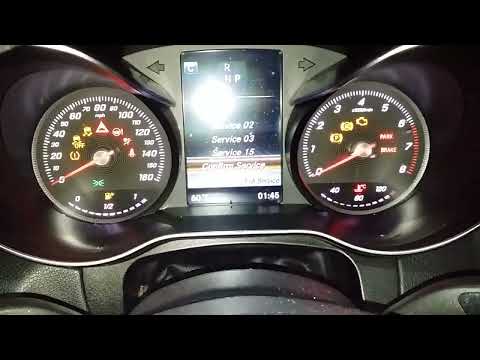
Let's see how to reset the service light on a 2022 Mercedes GLC with a digital display: turn on the ignition and press and hold the "back" button on the steering wheel for about 5 seconds; while holding this button, briefly press the "ok" button in the center: this will take you to the technical service menu. Using the buttons on the steering wheel, select "assyst plus". Press the start button a second time to bring the car to the full ignition position, with all lights on. Go back to the menu and select "full service". You will be asked to confirm that the service has been performed. Select "yes", and once confirmed, the screen will display a message indicating the reset was successful. You can turn off the ignition.
Posted on 1 May 2026 by ScegliAuto
Video tutorial
Related tutorials
Mercedes Glc
(2015-2022 /
C253, X253, MK 1)
Let's see how to reset the service of a Mercedes GLC MK1 produced from 2015 to 2022. First, let's turn on the instrument cluster by turning the key t…

Mercedes Glc
(2015-2022 /
C253, X253, MK 1)
In this tutorial we can see how to reset the service in the Mercedes GLC, an extremely simple and quick operation, to be carried out only after compl…
Mercedes Glc
(2015-2022 /
C253, X253, MK 1)
In this tutorial, you will see how to reset the service light on a Mercedes GLC. This operation is very simple and quick, and should only be performe…
Other guides you may be interested in
|
Where is the Spare Wheel in the Peugeot 5008?
This video shows where the spare wheel is located in the Peugeot 5008 and how to access it, useful in case of a puncture. As shown, the wheel is not in the usual boot compartment but underneath it, outside the vehicle. To free the wheel, first gather the tools provided, then open the boot, locate the small indicated hatch, and open it. Next, loosen the bolt just released using the large socket wrench enough to lower the wheel to the ground. by ScegliAuto More videos
|

|
For advertising on this site Write to info@scegliauto.com
ScegliAuto is not responsible for any inaccuracy of the data in the lists. To report any inaccuracy or your business (if you own the business in question), please write to info@scegliauto.com
Number of seconds to generate the page: 0.170
(c) ScegliAuto 2026 - info@scegliauto.com - Privacy policy VAT number: IT01247470535 |
