
|
Do it yourself
| |||
| ||||


How to reset the TPMS light on the MG HS?
Model: MG HS
MK 1
- Years 2019-2026
The tire pressure sensor of the MG HS has the ability to reset automatically every time you adjust the pressure when the warning light appears. Simply turn on the vehicle and rev the engine or drive a few kilometers to ensure that the light turns off and resets. In the event that the reset does not happen automatically, you can use the button located inside the passenger side glove compartment. Simply press it for a few seconds to successfully reset it. Remember to manually reset it only after adjusting the tire pressure.
Posted on 4 September 2024 by ScegliAuto
Video tutorial
Related tutorials
MG HS
(2019-2026 /
MK 1)
Today we will explain how to reset the tire pressure warning light on an MG HS car. Unlike many other vehicles, on this type of car it is not necessa…

MG HS
(2019-2026 /
MK 1)
When the tire pressure monitoring system (TPMS) light comes on in the instrument panel of your new MG HS, it means that the vehicle's control unit ha…

MG HS
(2019-2026 /
MK 1)
If we puncture a tire, or if it is deflated, or if the electronic sensor inside it is broken, the warning light on the instrument panel will alert us…
Other guides you may be interested in
|
How to Remove the Air Vents on an Alfa Romeo 159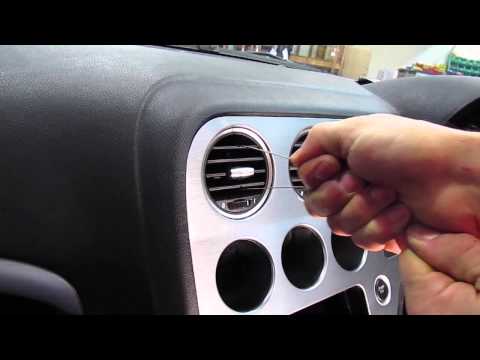
This video shows how to remove the air vents on an Alfa Romeo 159. Start by using a plastic trim tool to detach the air vents located in the central dashboard; if you have difficulty, obtain metal hooks (as shown in the video) and insert them into the air vent. Once the two hooks are secured to the edges of the air vent, pull them out with your hands until the vent is removed from its housing. Repeat this procedure for the other air vents present on the car's dashboard. Finally, install the new vents. by ScegliAuto More videos
|

For advertising on this site Write to info@scegliauto.com
ScegliAuto is not responsible for any inaccuracy of the data in the lists. To report any inaccuracy or your business (if you own the business in question), please write to info@scegliauto.com
Number of seconds to generate the page: 0.053
(c) ScegliAuto 2026 - info@scegliauto.com - Privacy policy VAT number: IT01247470535 |
