
|
Do it yourself
| |||
| ||||


How to Replace the Battery on a Nissan Micra
Model: Nissan Micra
K11
- Years 1992-2002
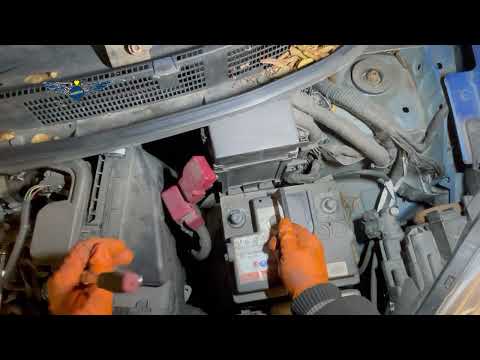
Is the battery of your Micra dead? Does it need replacing? Let’s look at removing the faulty battery from the engine compartment. Open the car door and pull up the engine compartment release lever located at the bottom left of the dashboard, then lift the front bonnet by releasing the locking lever with your fingers. You will find the battery on the right side of the engine compartment; unscrew the retaining bolts of the battery terminals and the bolts of the locking bracket. Remove the battery from the engine compartment and replace it with a new one (same voltage). Test the battery's operation before closing the engine compartment.
Updated on 19 April 2026 by ScegliAuto
Video tutorial
Related tutorials
Nissan Micra
(2010-2017 /
K13)
Changing the battery of the key/remote, speaking of the Nissan Micra, is a really easy job, it does not require great technical skills and everything…

Nissan Micra
(2017-2024 /
K14)
The Nissan Micra doesn't start? The cause could be a non-functioning battery. Once it has been confirmed that this is indeed the problem, it is neces…
Nissan Micra
(2010-2017 /
K13)
Below are the steps to remove and replace the engine battery in a Nissan Micra, following the instructions provided. First, open the bonnet of the ve…
Other guides you may be interested in
|
How to Replace the Cabin Filter on the Opel Grandland X
If you own an Opel Grandland X and want to know the steps to replace the cabin air filter, carefully read the following guide and follow the described steps. First, enter the vehicle and go to the passenger side. Then, locate the box containing the air filter in the lower side area of the dashboard. Remove the cover of the box and finally replace the old filter with the new one. Refit the cover, and you are done. by ScegliAuto More videos
|
|
For advertising on this site Write to info@scegliauto.com
ScegliAuto is not responsible for any inaccuracy of the data in the lists. To report any inaccuracy or your business (if you own the business in question), please write to info@scegliauto.com
Number of seconds to generate the page: 0.139
(c) ScegliAuto 2026 - info@scegliauto.com - Privacy policy VAT number: IT01247470535 |
