
|
Do it yourself
| |||
| ||||


How to reset the tire pressure warning light on the Peugeot 208
Model: Peugeot 208
UW, MK 2, UP, UJ, UB
- Years 2019-2026
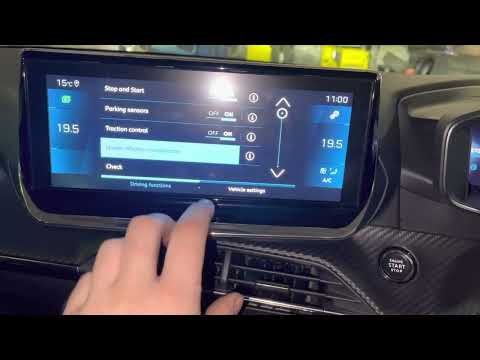
Today we will discover the instructions that will allow us to reset the tire pressure warning light of the Peugeot 208, as well as the 2008; before performing the TPMS sensor reset, it is necessary that all four tires are at the correct pressure. First, we get into the car and start the instrument panel; then we go to the vehicle settings on the central display and then to the tire pressure option, as shown in the video. At this point, we confirm and perform the tire pressure warning reset, confirming the recalibration of the TPMS sensors.
Posted on 7 June 2025 by ScegliAuto
Video tutorial
Related tutorials
Peugeot 208
(2012-2019 /
MK 1, A9)
Today, we will discover the process that will allow us to reset the tire pressure monitoring system (TPMS) warning light on the Peugeot 208; before p…

Peugeot 208
(2012-2019 /
MK 1, A9)
In this tutorial, we can see how to reset the tire pressure warning light in the Peugeot 208, a very simple and quick operation, to be carried out on…
Peugeot 208
(2019-2026 /
UW, MK 2, UP, UJ, UB)
In this tutorial, we can see how to reset the tire indicator in the Peugeot 208, a very simple and quick operation, to be performed only after restor…
Other guides you may be interested in
|
How to Replace the Thermostat on a Fiat Punto 2 Series 8v
When replacing the thermostat, it is advisable to drain the coolant system completely. The thermostat is located just above the gearbox, directly under the ignition coils. To facilitate the replacement, disconnect the intake duct hose and remove the coil pack. At this point, disconnect the connector from the thermostat and proceed to remove the corresponding fixing pins to replace it with the new one, ensuring to use a new gasket. by ScegliAuto More videos
|
|
For advertising on this site Write to info@scegliauto.com
ScegliAuto is not responsible for any inaccuracy of the data in the lists. To report any inaccuracy or your business (if you own the business in question), please write to info@scegliauto.com
Number of seconds to generate the page: 0.048
(c) ScegliAuto 2026 - info@scegliauto.com - Privacy policy VAT number: IT01247470535 |
