
|
Do it yourself
| |||
| ||||



Polestar 2: How to Restart the Infotainment System from the Home Button
Model: Polestar Polestar 2
MK 1
- Years:
2022, 2023, 2024, 2025, 2026
Video tutorial
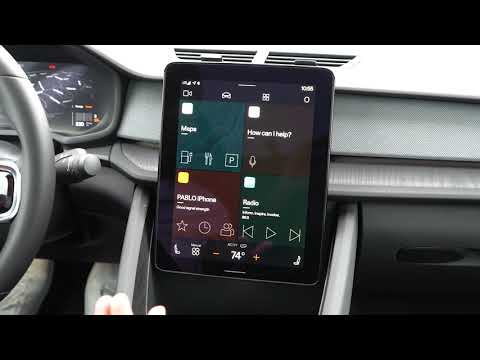
To restart the infotainment system of the Polestar 2, ensure the car is safely parked with the gear in P and the ignition on. On the large central display, locate the light bar at the bottom that serves as the Home button. Press and hold the button without releasing it: after a few seconds, the screen will switch to a black screen with the message "Screen cleaning mode active - hold the Home button to deactivate it." Continue holding the Home button until the display completely turns off. After a moment, the text "Polestar 2" will appear, and the system will begin to restart. Wait for the main screen with the apps and navigation and multimedia tiles to return: at this point, the restart of the Polestar 2 infotainment system is complete, and the system is ready for use again.
Posted on 22 May 2026 by ScegliAuto
Related tutorials
Polestar Polestar 2
(2022-2026 /
MK 1)
Let's see how to reset the infotainment system on a Polestar 2: to restart the operating system without losing the settings, we can attempt a soft re…

Polestar Polestar 2
(2022-2026 /
MK 1)
Below we will see the information that will allow us to reset the TCAM multimedia system of the Polestar 2, in simple and quick steps. First, we get …
Polestar Polestar 2
(2022-2026 /
MK 1)
In the Polestar 2, the infotainment system may freeze or show various signs of malfunction. In such cases, you can try to resolve the issue by perfor…
Other guides you may be interested in |
How to Set the Time in an Audi A4?
In this tutorial, you will see how to set the time in an Audi A4, a very simple and quick operation to perform after replacing the battery or when the time changes. First, insert the key and turn on the instrument cluster. Then, press the "SETUP" button located on the center console. Next, press the upper left arrow button, navigate to the "Time" option, and use the central knob to adjust the clock. Finally, set any necessary formats and save by returning to the main screen. by ScegliAuto More videos
|
|
For advertising on this site Write to info@scegliauto.com
ScegliAuto is not responsible for any inaccuracy of the data in the lists. To report any inaccuracy or your business (if you own the business in question), please write to info@scegliauto.com
Number of seconds to generate the page: 0.008
(c) ScegliAuto 2026 - info@scegliauto.com - Privacy policy VAT number: IT01247470535 |
