
|
Do it yourself
| |||
| ||||


How to Reset the Infotainment System on a Polestar 2
Model: Polestar Polestar 2
MK 1
- Years 2022-2026
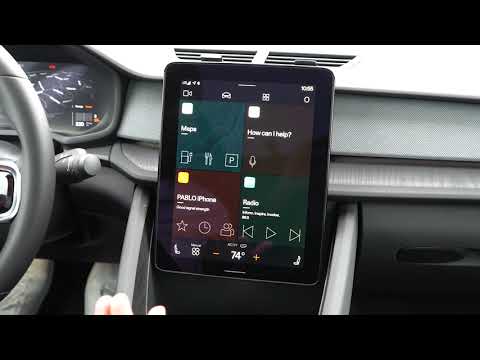
Let's see how to reset the infotainment system on a Polestar 2: to restart the operating system without losing the settings, we can attempt a soft reset by tapping the "settings" icon, then go to "system", select the "restart" option, and wait 30 to 60 seconds while the system restarts. If the screen does not respond at all, a hard reset with the physical buttons will be necessary, which does not delete the data. Locate the "rear window defrost" button, and hold it down for about 20 to 30 seconds. The screen will turn off and then turn back on by itself: release the button when you see the Polestar logo. For persistent issues, it will be necessary to restart all onboard electronics, which is equivalent to completely turning off and on a computer. Put the car in "P" mode, exit the car, lock the car with the remote while stepping away. Wait at least 15 minutes and then return and start the car normally.
Posted on 8 April 2026 by ScegliAuto
Video tutorial
Related tutorials
Polestar Polestar 2
(2022-2026 /
MK 1)
To restart the infotainment system of the Polestar 2, ensure the car is safely parked with the gear in P and the ignition on. On the large central di…

Polestar Polestar 2
(2022-2026 /
MK 1)
Below we will see the information that will allow us to reset the TCAM multimedia system of the Polestar 2, in simple and quick steps. First, we get …
Polestar Polestar 2
(2022-2026 /
MK 1)
In the Polestar 2, the infotainment system may freeze or show various signs of malfunction. In such cases, you can try to resolve the issue by perfor…
Other guides you may be interested in
|
How to open the fuel tank door in the Hyundai I20?
In this tutorial we can see how to open the fuel tank door in the Hyundai I20, a very simple operation similar to the typical procedure of many vehicles. First of all, let's go inside the cabin, it is not necessary to insert the key or unlock all the locks, then we locate and operate the lever located in the lower left area of the cabin, right next to the driver's seat. Once we have done this, we exit the vehicle, open the door completely and unscrew the fuel tank cap. To close the door, simply press it gently until you hear a click. by ScegliAuto More videos
|
|
For advertising on this site Write to info@scegliauto.com
ScegliAuto is not responsible for any inaccuracy of the data in the lists. To report any inaccuracy or your business (if you own the business in question), please write to info@scegliauto.com
Number of seconds to generate the page: 0.061
(c) ScegliAuto 2026 - info@scegliauto.com - Privacy policy VAT number: IT01247470535 |
