
|
Do it yourself
| |||
| ||||


How to Remove the Wiper Arm on a Scenic
Model: Renault Scenic
Scenic 3, MK 3, MK III, Scenic III
- Years 2009-2015
Is the rear wiper arm damaged? Let’s see how to remove the arm and install it on the tailgate. Lift the protective plastic on the side of the wiper arm. Locate the nut securing the wiper arm beneath the plastic. Use the appropriate spanner to loosen the nut that secures the wiper arm: slide the arm off the threaded shaft. Once the wiper arm is removed, install the new part with all the fastening pieces (fit the blade). Finally, test the operation of the arm and the fitted blade.
Updated on 16 April 2026 by ScegliAuto
Video tutorial
Related tutorials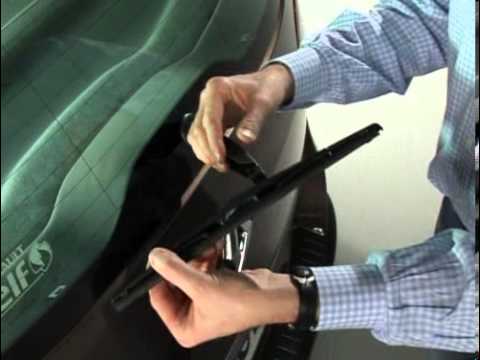
Renault Scenic
(2009-2015 /
Scenic 3, MK 3, MK III, Scenic III)
Let's briefly go over the instructions that will allow us to remove and replace the rear wiper blade on the Renault Scenic in simple and quick steps.…

Renault Scenic
(2003-2009 /
MK 2, Scenic 2)
Go to the back of the car and lift the rear wiper arm to disengage the wiper blade from its housing on the arm. Once the wiper arm is raised, pull th…

Renault Scenic
(2003-2009 /
MK 2, Scenic 2)
Replacing the windshield wiper blades on the Renault Scenic model 2 is a simple and quick operation to be carried out independently. First, lift the …
Other guides you may be interested in |
Frequently Asked QuestionsHow to Adjust the Brightness of the Instrument Cluster on a Peugeot 3008?
To adjust the brightness of the instrument cluster on a Peugeot 3008, you need to turn on the ignition and access the settings via the menu located in the central area of the dashboard. In the screen that appears, select the "Display Configuration" option: now, by selecting the "Brightness" option, you can adjust it using the dedicated slider that will appear on the screen. The adjustment should be made with the headlights on as well as with them off. Once the adjustment is complete, you can turn off the instrument cluster. by ScegliAuto More videos
|
|
For advertising on this site Write to info@scegliauto.com
ScegliAuto is not responsible for any inaccuracy of the data in the lists. To report any inaccuracy or your business (if you own the business in question), please write to info@scegliauto.com
Number of seconds to generate the page: 0.339
(c) ScegliAuto 2026 - info@scegliauto.com - Privacy policy VAT number: IT01247470535 |
