
|
Do it yourself
| |||
| ||||


How to Understand the Fuse Diagram on a Smart 450?
Model: Smart Smart
450
- Years:
1998, 1999, 2000, 2001, 2002, 2003, 2004, 2005, 2006, 2007
This video is currently unavailable
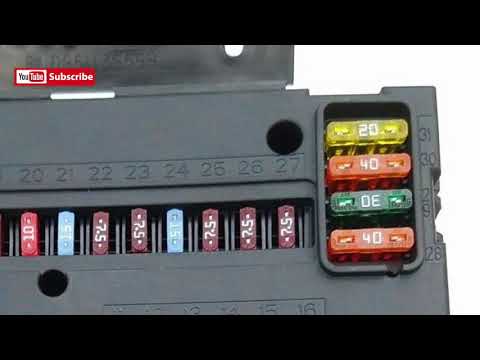
This video shows the fuse diagram for the Smart 450 (model from 1998 to 2007). These diagrams allow you to identify the function of each individual fuse and understand which device corresponds to the fuse you need to replace. A blown fuse can happen occasionally; in that case, it should be replaced and monitored to ensure the problem does not recur. A fuse that blows frequently indicates an issue with that particular device. For example, if the radio fuse blows often, it means the radio is drawing too much current for what was intended. This could indicate a fault or a damaged wire causing short circuits. This video also helps you understand the exact current rating for each fuse replacement. Never replace a fuse with a different rating than the original to avoid overheating and/or short circuits.
Updated on 15 April 2026 by ScegliAuto
Related tutorials
Smart
(1998-2007 /
450)
The service light on the Smart 450 can be reset as follows: turn on the instrument panel, select the relevant Service option from those available in …

Smart
(1998-2007 /
450)
To access the fuses that control the devices installed on the Smart 450, locate the appropriate fuse boxes on the vehicle. This car has a single box …
Smart
(1998-2007 /
450)
In this video, you can see where the fuse box is located on the Smart 450. The Smart 450 has two fuse boxes: one positioned on the driver's side (vis…
Other guides you may be interested in
|
Frequently Asked QuestionsHow to Reset the AdBlue Warning Light on a Peugeot Boxer
To reset the AdBlue system on a 2018 Peugeot Boxer, follow these steps: Start the engine and ensure the vehicle is parked in a well-ventilated area. Locate the "MENU" button on the dashboard or steering wheel controls. Press and hold the "MENU" button until the menu options appear on the display. Use the arrow buttons or scroll wheel to access the "Vehicle Settings" or "Settings" menu. Select the "AdBlue" or "AdBlue System" option. Look for the "Recharge" or "Reset" option in the AdBlue menu. Once you find the reset option, select it and confirm your choice when prompted. The system will be reset, and a confirmation message may appear on the display. Turn off the engine and wait a few seconds. Restart the engine and check that the AdBlue system has been reset. by ScegliAuto More videos
|
|
For advertising on this site Write to info@scegliauto.com
ScegliAuto is not responsible for any inaccuracy of the data in the lists. To report any inaccuracy or your business (if you own the business in question), please write to info@scegliauto.com
Number of seconds to generate the page: 0.012
(c) ScegliAuto 2026 - info@scegliauto.com - Privacy policy VAT number: IT01247470535 |
