
|
Do it yourself
| |||
| ||||



How to Replace the Speakers in a Smart 451?
Model: Smart Smart
451
- Years:
2007, 2008, 2009, 2010, 2011, 2012, 2013, 2014, 2015
Video tutorial
To replace the speaker in the Smart 451, first remove the plastic cover located near the external rear-view mirror. By loosening the screws underneath, along with those near the locking mechanism, you can first remove the external rear-view mirror and then the outer door panel. Now, you can remove the internal speaker cover and then unscrew the bolts that secure it both internally and externally. Once the screws are removed, disconnect the connector, take out the speaker, and replace it.
Updated on 25 April 2026 by ScegliAuto
Related tutorials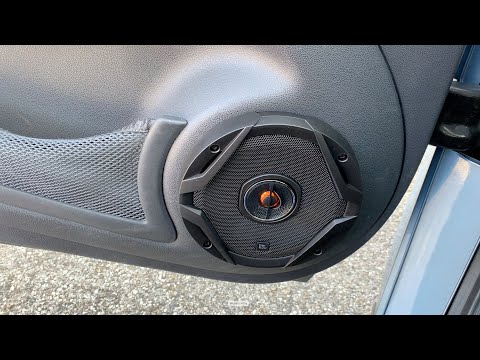
Smart
(2007-2015 /
451)
To replace the speakers on a Smart 451, use a tool like a screwdriver to pry off the outer cover of the speaker, which is fitted into the door panel.…

Smart
(2007-2015 /
451)
In this guide we will see the instructions that will allow us to install the front door speakers of the Smart Fortwo. First of all, we open the front…
Smart
(2007-2015 /
451)
To replace the speakers in a Smart, use a flathead screwdriver to remove the outer cover of the speaker. Pry between the cover and the door panel, re…
Other guides you may be interested in |
How to Activate the Automatic Folding and Unfolding of the Wing Mirrors on the Jeep Compass
Follow these brief instructions to activate the automatic folding and unfolding of the external wing mirrors on the Jeep Compass. First, get inside the vehicle and turn on the ignition; then press the button located beneath the mirror glass adjustment to electrically open the mirror, as shown in the video. Pressing the button in the opposite direction will close the mirrors; by holding the button, the mirrors will open and close automatically! by ScegliAuto More videos
|
|
For advertising on this site Write to info@scegliauto.com
ScegliAuto is not responsible for any inaccuracy of the data in the lists. To report any inaccuracy or your business (if you own the business in question), please write to info@scegliauto.com
Number of seconds to generate the page: 0.019
(c) ScegliAuto 2026 - info@scegliauto.com - Privacy policy VAT number: IT01247470535 |
