
|
Do it yourself
| |||
| ||||


How to replace the battery of the Volkswagen Atlas remote control?
Model: Volkswagen Atlas Terramont
MK 1
- Years 2017-2025
In this tutorial we can see how to replace the battery of the Volkswagen Atlas remote control, an extremely simple and quick operation. To do this we will need a replacement battery of type CR2032 and a small screwdriver with a flat tip. First of all, we extract the emergency metal key by pressing the appropriate button, then we use the key itself to lever in the indicated slot in order to unlock the rear door. At this point we remove the old battery, insert the replacement respecting the polarity and reassemble everything.
Posted on 22 February 2025 by ScegliAuto
Video tutorial
Related tutorials
Volkswagen Atlas Terramont
(2017-2025 /
MK 1)
It will be possible to replace the battery of the Volkswagen Atlas remote control by pressing the button located on the top of the device: once this …

Volkswagen Atlas Terramont
(2017-2025 /
MK 1)
If you own a Volkswagen Atlas and are curious to discover how to replace the battery located inside the car key remote, then all you have to do is re…
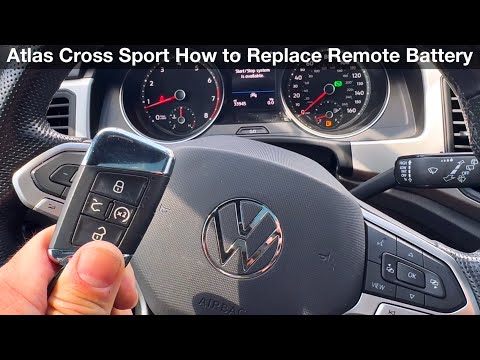
Volkswagen Atlas Terramont
(2017-2025 /
MK 1)
The following steps will show you how to disassemble and replace the battery in the key fob for a Volkswagen Atlas. First, take your key fob and star…
Other guides you may be interested in
|
How to open the fuel tank door in the Hyundai I20?
In this tutorial we can see how to open the fuel tank door in the Hyundai I20, a very simple operation similar to the typical procedure of many vehicles. First of all, let's go inside the cabin, it is not necessary to insert the key or unlock all the locks, then we locate and operate the lever located in the lower left area of the cabin, right next to the driver's seat. Once we have done this, we exit the vehicle, open the door completely and unscrew the fuel tank cap. To close the door, simply press it gently until you hear a click. by ScegliAuto More videos
|
|
For advertising on this site Write to info@scegliauto.com
ScegliAuto is not responsible for any inaccuracy of the data in the lists. To report any inaccuracy or your business (if you own the business in question), please write to info@scegliauto.com
Number of seconds to generate the page: 0.193
(c) ScegliAuto 2026 - info@scegliauto.com - Privacy policy VAT number: IT01247470535 |
