
|
Do it yourself
| |||
| ||||


Discover Media and Discover Pro hidden menu Volkswagen Golf 7
Model: Volkswagen Golf
Golf VII, MK 7, Golf 7
- Years 2012-2019
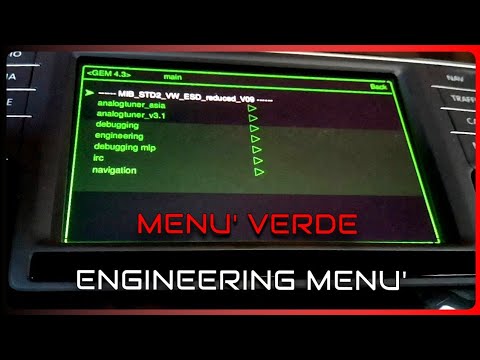
In today’s video, we will see how to access the hidden sub-menu of the Discover Media and Discover Pro audio systems in the Volkswagen Golf 7. The first step is to turn on the display. Next, press and hold the MENU button to access what you were looking for. Enter service mode; you can see the software versions of the radio, any updates, and how to perform them (whether via CD, SD card, or USB). You can then access the HMI menu to see other important data, such as the history of changes installed on your navigation system. Then, go back using the menu button.
Updated on 30 April 2026 by ScegliAuto
Video tutorial
Related tutorials
Volkswagen Golf
(2012-2019 /
Golf VII, MK 7, Golf 7)
In today's video, we will see how to update the sat nav on a Volkswagen Golf 7; specifically, this is the Discover Media model. Check which version o…

Volkswagen Golf
(2003-2008 /
MK 5, Golf 5, Golf V)
In this brief guide, we will see the instructions that will allow us to access the hidden menu of the air conditioner in the Volkswagen Golf Plus. Fi…
Volkswagen Golf
(2012-2019 /
Golf VII, MK 7, Golf 7)
This short video shows how to unlock the hidden menus on your Volkswagen Golf 7. First, with the engine off but the ignition on, press and hold the m…
Other guides you may be interested in |
How to Connect the Cables to the Battery of the Citroen Xsara Picasso?
In this tutorial, you will see how to connect the cables to the battery of the Citroen Xsara Picasso, useful if you need to recharge it or perform an emergency start. First, ensure the key is not inserted, then open the bonnet and move to the front of the left headlamp. Next, locate the bolt just behind the filter box and connect the positive terminal clamp to it. Now you can connect the negative terminal to any point on the chassis, such as the indicated point. Once the operation is complete, ensure you disconnect the negative first and then the positive. by ScegliAuto More videos
|

|
For advertising on this site Write to info@scegliauto.com
ScegliAuto is not responsible for any inaccuracy of the data in the lists. To report any inaccuracy or your business (if you own the business in question), please write to info@scegliauto.com
Number of seconds to generate the page: 0.333
(c) ScegliAuto 2026 - info@scegliauto.com - Privacy policy VAT number: IT01247470535 |
