
|
Do it yourself
| |||
| ||||


|
Model: Yamaha R1 Yamaha
In this tutorial we can see how to adjust the time on the Yamaha R1, a very simple and fast operation, to be carried out for example after the switch to daylight saving time or legal time, or after disconnecting the battery. First of all, insert the key, then turn on the instrument panel and hold down the two left buttons of the dashboard for the necessary time for the clock to start flashing. Adjust the time using the "Reset" button, move on to the minutes with the "Select" button, and similarly adjust them before saving the setting.
Posted on 2 February 2025 by ScegliAuto
Video tutorial
Related tutorials
R1 Yamaha
To set the time on a Yamaha R1, start by ensuring that the motorcycle is turned on. Use the button on the right-hand side switchgear to enter the set…
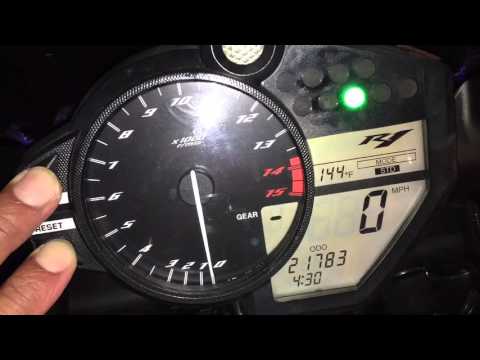
R1 Yamaha
In this tutorial, learn how to set the time on the Yamaha R1, a very simple and quick operation to perform after replacing the battery or when switch…

R1 Yamaha
In order to replace the air filter of the Yamaha R1, you need to loosen the screws that secure the motorcycle seat to its housing: these screws will …
|
How to replace the coolant in the BMW S1000 R
Today, we will see in this video tutorial how to bleed and replace the coolant in the BMW S1000 R motorcycle. First, place your motorcycle on a stand and start unscrewing the bleed screw located on the water pump casing, found at the bottom right; let the fluid drain into a container for about ten minutes. Now, unscrew the radiator cap and top up with the new coolant, the correct type for your radiator; fill it to the maximum level mark, starting the engine to circulate the fluid! by ScegliAuto More videos
|
|
For advertising on this site Write to info@scegliauto.com
ScegliAuto is not responsible for any inaccuracy of the data in the lists. To report any inaccuracy or your business (if you own the business in question), please write to info@scegliauto.com
Number of seconds to generate the page: 0.007
(c) ScegliAuto 2026 - info@scegliauto.com - Privacy policy VAT number: IT01247470535 |
