Do it yourself
Frequently asked questions about cars and motorcycles
  1. Car
  2. :
  3. Audi
  4. :
  5. A4
  6. : Window switch

Audi A4 - Window switch

Window Switch Audi A4 (2007-2016 / b 8)

Audi A4 (2004-2008 / B7)
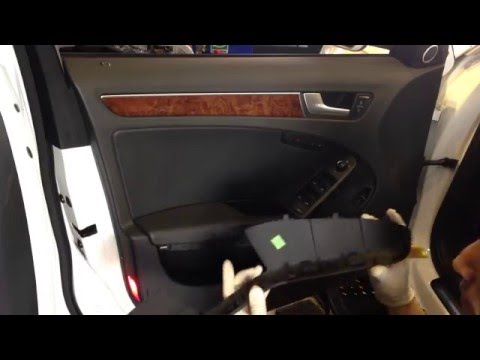
How to replace the power window switch of the Audi A4

Today we will see the steps that will allow us to disassemble and replace the switch and window switch panel of the Audi A4. First, we open the front door of …Read all…
Posted on 30 July 2025 by ScegliAuto
Audi A4 (2007-2016 / B8)
How to Remove the Window Switch from an Audi A4

Do you want to remove the window switch button from your Audi and don't know how? Let's go through the correct steps together in this video. Before starting …Read all…
Posted on 10 March 2026 by ScegliAuto
Audi A4 (2004-2008 / B7)
How to Replace the Window Switch on an Audi A4

Open the door that requires the switch replacement and remove the small panel located in the middle of the armrest. This will give you access to the screw that …Read all…
Posted on 8 March 2026 by ScegliAuto

Window Switch Audi A4 (2004-2008 / b 7)

Audi A4 (2004-2008 / B7)
How to replace the power window switch of the Audi A4

Today we will see the steps that will allow us to disassemble and replace the switch and window switch panel of the Audi A4. First, we open the front door of …Read all…
Posted on 30 July 2025 by ScegliAuto
Audi A4 (2007-2016 / B8)
How to Remove the Window Switch from an Audi A4

Do you want to remove the window switch button from your Audi and don't know how? Let's go through the correct steps together in this video. Before starting …Read all…
Posted on 10 March 2026 by ScegliAuto
Audi A4 (2004-2008 / B7)
How to Replace the Window Switch on an Audi A4

Open the door that requires the switch replacement and remove the small panel located in the middle of the armrest. This will give you access to the screw that …Read all…
Posted on 8 March 2026 by ScegliAuto

Accelerator (1) Cigarette lighter (1) Airbag (8) Alternator (7) Speaker (3) Shocks (10) Antenna (1) Air conditioning (11) Car stereo (20) Battery (27) Air vents (1) Bushings (1) Control arm (10) Transmission (5) Spark plugs (10) Glow plugs (4) Convertible top (6) Body (8) Glove compartment (16) Control unit (9) Key (103) Trunk lock (2) Timing belt (47) V-belt (7) Air conditioner (1) A/C controls (6) Onboard computer (14) Checks and maintenance (75) Throttle body (2) Dashboard (7) Shifter boot (3) CV boot (1) Bearing (2) MAF sensor (1) Brake rotors (6) Headlight (33) Tail light (21) Fog lights (4) Diesel particulate filter (2) Air filter (18) Cabin air filter (24) Fuel filter (3) Diesel fuel filter (5) Oil filter (4) Parking brake (4) Clutch (1) Grille (7) Fuel injectors (2) Window switch (3) Accessory kit (7) Xenon headlight kit (1) Light bulb (8) Headlight bulb (30) Tail light bulb (14) Interior dome light bulb (14) Antifreeze coolant (1) License plate light (5) (6) Handle (12) Exhaust muffler (1) Engine (8) Power window motor (7) Starter motor (11) Transmission fluid (6) Engine oil (8) Power steering fluid (1) Clock (23) Door trim panel (45) Windshield (1) Front bumper (18) Rear bumper (11) Brake pads (9) Hydraulic pistons (2) Tires (2) Shift knob (13) Pump (4) Fuel pump (22) Car door (6) Push button (5) Power window switch (8) Instrument cluster (10) Radiator (6) Heater core (7) Wheel (3) Fuse box (87) Seat (28) Axle shaft (4) Crankshaft position sensor (5) Engine coolant temperature sensor (3) Parking sensors (1) Door lock (10) Brake system (2) Suspension system (2) Side mirror (17) Rearview mirror (6) AdBlue warning light (13) Warning light – error code (38) (32) Tire pressure warning light (8) Service warning light (116) Manufacturer emblem (1) Engine mount (2) Fuel cap (8) Windshield wipers (12) Thermostat (14) Tie rods (1) Center console tunnel (3) Turbocharger (3) Valve (3) EGR valve (3) Blower motor (2) Side window (2) Steering wheel (5)

How to Set the Clock on the Opel Zafira

Setting the clock to the current Italian time on an Opel Zafira model B is a very simple operation, also made easier by our short instructional video. The first step is to turn on the instrument panel and then press the SETTING button located on the central dashboard. Once inside the menu, use the buttons to navigate to the clock setting. Adjust the hours and minutes and restart the instrument panel. If the clock does not update, it may be necessary to diagnose the radio or the vehicle's control unit.

Watch the video!


by ScegliAuto

More videos