
|
Do it yourself
| |||
| ||||


How do you repair the MMI in a 2008 Audi A6 C6?
Model: Audi A6
MK 3, C6
- Years 2004-2012
Don't panic. Repairing the MMI (Multi Media Interface) of a 2008 Audi A6 C6 may seem complicated, but with a little patience it can be done. First of all, make sure the problem is not related to burnt fuses or loose connections. If the screen does not turn on or shows errors, try resetting the system: press and hold the "Media" and "Setup" buttons simultaneously for a few seconds. If the fault persists, it could be a more serious issue, such as a defect in the MMI module or its wiring. In this case, you should dismantle the central console, remove the display and check for any damage. If necessary, replace the faulty module or cable. A final option is to seek help from a professional to avoid further damage.
Posted on 10 October 2025 by ScegliAuto
Video tutorial
Related tutorials
Audi A6
(2004-2012 /
MK 3, C6)
To reset the MMI system of the Audi A6, first turn on the instrument panel by inserting the ignition key into the corresponding slot. Once the panel …

Audi A6
(2004-2012 /
MK 3, C6)
It will be possible to perform a reset of the MMI system in the Audi A6 by first turning on the instrument panel, inserting the ignition key into the…
Audi A6
(2018-2026 /
C8, MK 5)
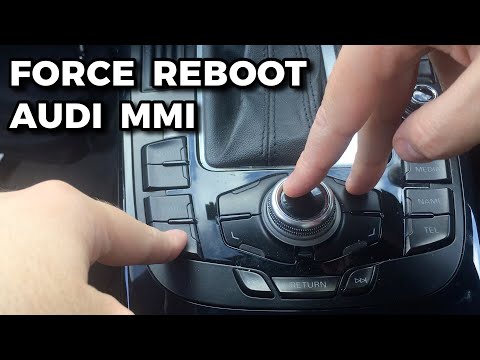
The MMI multimedia entertainment system installed in Audi vehicles can be easily reset using just three buttons. These are located on the center cons…
Other guides you may be interested in |
How to Check the Oil Level on a Jeep Renegade?
To check the oil level on a Jeep Renegade, you need to open the bonnet to access the components inside the engine bay: on the lower left side of the engine block, you will find the dipstick for checking the level. This should be pulled out and thoroughly cleaned with a cloth: once cleaned, reinsert it back into its tube and pull it out immediately after. This way, you can check that the oil mark is between the minimum and maximum levels; finally, you can place the dipstick back in its tube. by ScegliAuto More videos
|
|
For advertising on this site Write to info@scegliauto.com
ScegliAuto is not responsible for any inaccuracy of the data in the lists. To report any inaccuracy or your business (if you own the business in question), please write to info@scegliauto.com
Number of seconds to generate the page: 0.457
(c) ScegliAuto 2026 - info@scegliauto.com - Privacy policy VAT number: IT01247470535 |
