
|
Do it yourself
| |||
| ||||


Removing On-Board Computer Display Audi A4 B8
Model: Audi A4
B8
- Years 2007-2016
In this video tutorial, you will learn how to remove the on-board computer display of an Audi A4. First, get inside the vehicle and use a plastic trim tool to remove the silver trim on the sides of the display; then disconnect the electrical connector found at the back. Next, unscrew the screws of the display and carefully remove it, disconnecting the other electrical connector located on the back. To reassemble everything, simply reverse the disassembly procedure, paying special attention to the connectors.
Updated on 30 March 2026 by ScegliAuto
Video tutorial
Related tutorials
Audi A4
(2007-2016 /
B8)
Today we will see which steps to take to reset the on-board computer of the Audi A4 independently. To reset the on-board computer to factory settings…

Audi A4
(2007-2016 /
B8)
Below we will see the instructions that will allow us to adjust the time on the Audi A4, in simple and quick steps. First of all, we get on board the…

Audi A4
(2007-2016 /
B8)
The service light on the Audi A4 can be reset from the onboard computer menu. To do this, use the button panel located on the center console, near th…
Other guides you may be interested in |
How to Open the Fuel Filler Cap of the 2020 Hyundai Tucson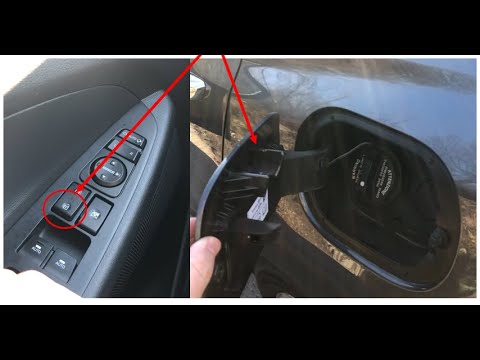
The 2020 Hyundai Tucson has two methods for opening the fuel filler flap. Both methods can only be used if the key has been removed from the ignition and the engine is off. The first method involves removing the key from the ignition and keeping all the car locks open, then go to the flap and press it. This will open the flap. The second method is to stay in the car, remove the key from the ignition, and then press the fuel filler release button located on the left door. by ScegliAuto More videos
|
|
For advertising on this site Write to info@scegliauto.com
ScegliAuto is not responsible for any inaccuracy of the data in the lists. To report any inaccuracy or your business (if you own the business in question), please write to info@scegliauto.com
Number of seconds to generate the page: 0.544
(c) ScegliAuto 2026 - info@scegliauto.com - Privacy policy VAT number: IT01247470535 |
