
|
Do it yourself
| |||
| ||||


Model: Beta Rr 50
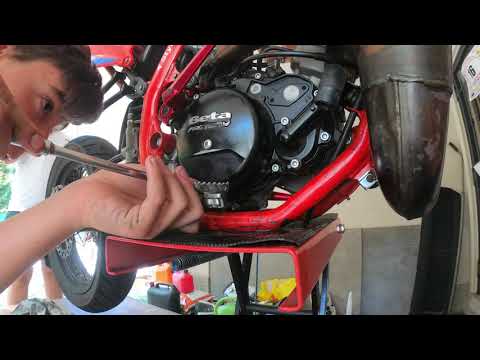
Follow the steps to remove and replace the clutch cover or casing of the Beta RR 50 enduro bike. First, place your bike on a stand and start draining the engine oil by unscrewing the oil drain bolt located under the engine; let it drain into a container for about ten minutes. Next, unscrew the screws of the clutch cover found on the sides to remove it and replace it with the new one; then securely fit the new clutch cover by installing the new gasket!
Updated on 29 June 2026 by ScegliAuto
Video tutorial
Related tutorials
Rr 50
This guide briefly outlines the instructions for disassembling and replacing the clutch discs on the Beta RR 50 enduro bike. First, place the bike on…

Rr 50
Today, we will explore the steps to remove and replace the clutch discs on the Beta RR 50 enduro bike. First, place the bike on a stand and begin dra…
Rr 50
This guide shows how to disassemble and replace the clutch discs on a Beta RR 50 with an AM6 engine. First, drain the engine oil by unscrewing the dr…
|
Where is the Battery on the Piaggio Medley 125 Scooter and How to Remove It?
In this video, see where the battery is located on the Piaggio Medley 125 scooter and how to remove it, a very simple and quick operation. As shown, it is located behind the front storage compartment, positioned under the handlebars. To access it, first open the compartment, then remove the right cover by unscrewing the relevant screws with a cross-head screwdriver. Once done, unscrew the additional screws of the battery cover with a Torx T25 key, extract it, and disconnect both terminals with the same screwdriver. To fit the replacement, simply follow the reverse procedure. by ScegliAuto More videos
|
|
For advertising on this site Write to info@scegliauto.com
ScegliAuto is not responsible for any inaccuracy of the data in the lists. To report any inaccuracy or your business (if you own the business in question), please write to info@scegliauto.com
Number of seconds to generate the page: 0.047
(c) ScegliAuto 2026 - info@scegliauto.com - Privacy policy VAT number: IT01247470535 |
