
|
Do it yourself
| |||
| ||||


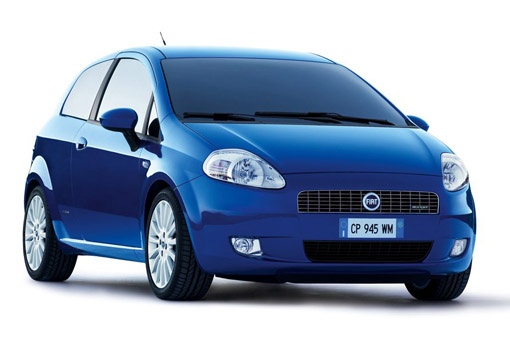
How to Set the Clock on a Fiat Grande Punto
Model: Fiat Punto
199, MK 3, Grandepunto , Punto EVO
- Years:
2005, 2006, 2007, 2008, 2009, 2010, 2011, 2012, 2013, 2014, 2015, 2016
Video tutorial
Today, you will learn how to set the clock on the instrument panel of the Fiat Grande Punto independently. To adjust the clock, turn on the instrument panel and press the menu button located on the left side of the dashboard. By holding the button for two seconds, you will access the settings menu, and by pressing the plus or minus button, you will display the various menu options. Select the time adjustment setting and by pressing the plus and minus buttons, set the hours and then the minutes. After that, return to the main menu by pressing the menu button and restart the instrument panel.
Posted on 10 May 2026 by ScegliAuto
Related tutorials
Fiat Punto
(2005-2018 /
199, MK 3, Grandepunto , Punto EVO)
To adjust and replace the gear cable on a Fiat Grande Punto, disconnect the battery and completely remove it from its housing. The cable is located n…
Fiat Punto
(2005-2018 /
199, MK 3, Grandepunto , Punto EVO)
In this brief and simple guide, you will find instructions to adjust the headlight height of the Fiat Grande Punto, as well as the Punto Evo. First, …

Fiat Punto
(1999-2011 /
MK 2, 188)
In today's video tutorial, you will see the instructions for adjusting the height and depth of the front headlights on a Fiat Grande Punto and Punto …
Other guides you may be interested in
|
How to Reset the Tyre Light on a Toyota Aygo?
To reset the tyre light on a Toyota Aygo, start by locating the reset button, which is found in the glove compartment of the front passenger side. Turn on the car and ensure that the tyres are at the correct pressure. Then, press and hold the reset button for a few seconds until the tyre light either flashes or turns off, depending on the model. Release the button and wait for the reset procedure to complete. Restart your Toyota Aygo and check if the tyre light has turned off, indicating that the reset was successful. by ScegliAuto More videos
|
|
For advertising on this site Write to info@scegliauto.com
ScegliAuto is not responsible for any inaccuracy of the data in the lists. To report any inaccuracy or your business (if you own the business in question), please write to info@scegliauto.com
Number of seconds to generate the page: 0.227
(c) ScegliAuto 2026 - info@scegliauto.com - Privacy policy VAT number: IT01247470535 |
