
|
Do it yourself
| |||
| ||||


Video tutorial
Turn on the instrument cluster of the 2015 Ford Ka and press the menu button to display the vehicle settings. Using the arrow button, navigate through the menu and select the 'Clock' option; by pressing the menu button simultaneously with the ok button, you can first modify the hours and then the minutes. Once you have finished the adjustments, press the ok button and return to the main menu; it is not necessary to restart the instrument cluster at the end of the procedure. It is not possible to set the automatic clock change on this type of vehicle, but from 2017 onwards, it will be possible.
Posted on 6 November 2026 by ScegliAuto
Related tutorials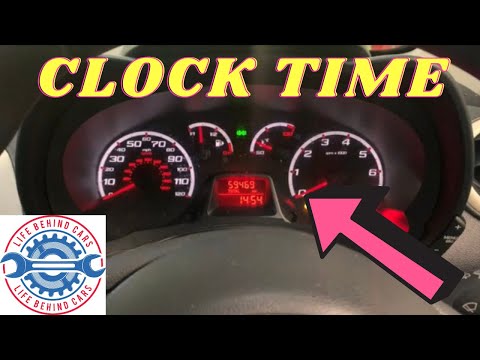
Ford Ka
(2008-2016 /
MK 2)
To set the clock of the Ford Ka, switch on the instrument panel so you can press the MENU button located on its right: then use the + and - buttons t…

Ford Ka
(1996-2008 /
MK 1)
Let's talk about a car that is certainly not equipped with technologically advanced equipment, but in its simplicity there are several advantages. Fo…

Ford Ka
(2016-2019 /
MK 3)
The instrument panel and onboard computer of Ford cars in general, not only of the Ford Ka but of many models of this manufacturer, allow you to view…
Other guides you may be interested in
|
How to Open the Fuel Filler Flap in the Hyundai i30?
In this tutorial, you will learn how to open the fuel filler flap in the Hyundai i30, a very simple operation that follows the typical procedure of most vehicles. First, unlock the locks using the designated button on the remote, then open the driver's door, locate the release lever on the left side of the seat, and operate it. Next, move to the fuel filler flap, open it completely, unscrew the cap, and refuel as needed. To close the flap, simply press it gently. by ScegliAuto More videos
|
|
For advertising on this site Write to info@scegliauto.com
ScegliAuto is not responsible for any inaccuracy of the data in the lists. To report any inaccuracy or your business (if you own the business in question), please write to info@scegliauto.com
Number of seconds to generate the page: 0.057
(c) ScegliAuto 2026 - info@scegliauto.com - Privacy policy VAT number: IT01247470535 |
