
|
Do it yourself
| |||
| ||||


Where Can I Find the Radio Code for My Ford?
Model: Ford Focus
MK 2, Focus 2
- Years:
2004, 2005, 2006, 2007, 2008, 2009, 2010, 2011
Video tutorial
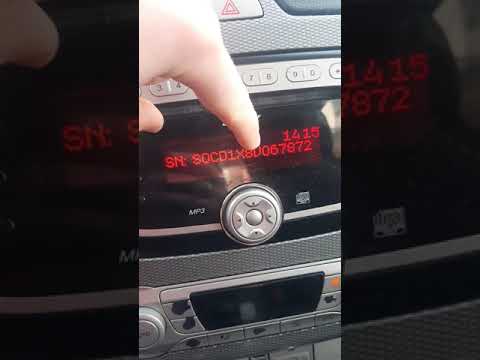
How many times have you turned on your car radio after changing the battery or during maintenance and seen the message: enter the unlock code, panic! Don't panic, the unlock code for your car radio is easier to find than you think. First, check the documents and the owner's manual provided when you purchased your Ford; you will find a card containing the radio unlock code. Can't find the card? No worries, follow the short video attached, and you'll find the solution. As a last resort, you can visit the nearest authorised Ford centre for assistance.
Updated on 23 April 2026 by ScegliAuto
Related tutorials
Ford Focus
(2004-2011 /
MK 2, Focus 2)
In this video, we will see how to enter the radio code on the audio system of a Ford Focus, where it may be necessary to re-enter the code (battery c…
Ford Focus
(2004-2011 /
MK 2, Focus 2)
If you are experiencing serious issues with your Ford Focus radio and need to enter the security code, do not worry as this guide will explain how to…

Ford Focus
(2004-2011 /
MK 2, Focus 2)
In this video we can see how to unlock the radio of a Ford Focus MK2, after it has been locked due to an intervention on the battery, for example; in…
Other guides you may be interested in |
Frequently Asked QuestionsHow to Reset the Tire Pressure Light on a MG ZS?
On the instrument cluster of the MG ZS, the tire pressure light that appears can be reset by inflating the tires to the correct pressure: this value will be indicated on the sticker attached to the driver's door pillar. Once the tires have been properly inflated, you can turn on the instrument cluster and navigate through the menu until you find the option that indicates tire pressure: if this screen shows the new values, the light will turn off; otherwise, you will need to drive for a few miles so that the sensors can read the new values and turn off the light afterward. by ScegliAuto More videos
|
|
For advertising on this site Write to info@scegliauto.com
ScegliAuto is not responsible for any inaccuracy of the data in the lists. To report any inaccuracy or your business (if you own the business in question), please write to info@scegliauto.com
Number of seconds to generate the page: 0.265
(c) ScegliAuto 2026 - info@scegliauto.com - Privacy policy VAT number: IT01247470535 |
