
|
Do it yourself
| |||
| ||||


How do you replace the rear window wiper on a Ford Escape?
Model: Ford Escape
MK 3
- Years 2013-2019
To replace the rear window wiper on the Ford Escape, lift the corresponding arm so that the blade is no longer in contact with the rear window; once lifted, it will be necessary to identify the internal fixing clips which are located in the center of the brush. By making sure that these clips are released, it will be possible to detach the corresponding brush from its arm. Now it will be possible to insert the new brush inside its housing, fixing it with the corresponding clips. After installation, you will need to activate the rear window wiper to check that it works properly.
Posted on 19 December 2022 by ScegliAuto
Video tutorial
Related tutorials
Ford Escape
(2013-2019 /
MK 3)
In order to replace the windshield wiper blades of the Ford Escape, you need to lift the wiper arms so that they are no longer in contact with the wi…

Ford Escape
(2013-2019 /
MK 3)
In order to replace the Ford Escape wiper blades you need to lift the arm connected to the blades, so that they are not in direct contact with the wi…

Ford Escape
(2001-2007 /
MK 1)
The fuses of the Ford Escape are contained inside the two fuse boxes that are installed in the car, one inside the passenger compartment and one in t…
Other guides you may be interested in
|
Entering Radio Code for Nissan Qashqai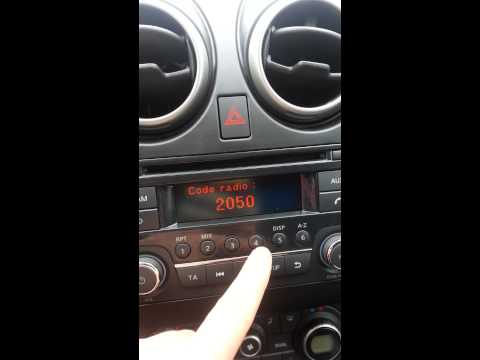
Today, in this very short video tutorial, you will learn how to enter the radio code for a Nissan Qashqai. The radio code can be found in the car's manual, provided by the manufacturer; sometimes it can also be found on the back of the radio. First, get inside the vehicle: when you turn on the radio, it will prompt you to enter the unlock code: input the code as shown in the video. At this point, the radio will unlock, and you can listen to all the music you want! Sometimes the code may not match yours. Check the manual for the correct code. by ScegliAuto More videos
|
|
For advertising on this site Write to info@scegliauto.com
ScegliAuto is not responsible for any inaccuracy of the data in the lists. To report any inaccuracy or your business (if you own the business in question), please write to info@scegliauto.com
Number of seconds to generate the page: 0.049
(c) ScegliAuto 2026 - info@scegliauto.com - Privacy policy VAT number: IT01247470535 |
