
|
Do it yourself
| |||
| ||||


How to Replace the Remote Battery in a Ford Ranger Pickup
Model: Ford Ranger
T6, P375, PX
- Years:
2011, 2012, 2013, 2014, 2015, 2016, 2017, 2018, 2019, 2020, 2021, 2022
Video tutorial
In this tutorial, you will see how to replace the battery in the remote of a Ford Ranger pickup, a very simple and quick operation. To do this, you will need a replacement battery of type CR2032 and a small flat screwdriver. First, extend the emergency key by pressing the appropriate button, then locate the indicated slot, insert the screwdriver into it, and pry it open. At this point, unlock the two halves of the remote, separate them, and remove the old battery from the housing. Finally, insert the replacement and reassemble everything.
Updated on 27 August 2026 by ScegliAuto
Related tutorials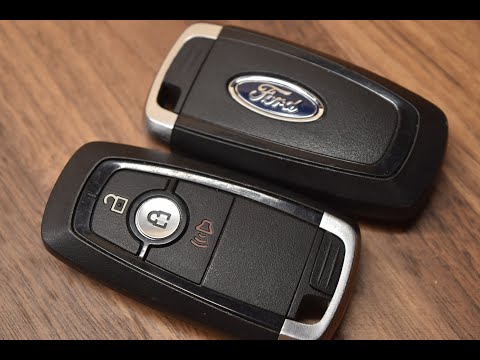
Ford Ranger
(2011-2023 /
T6, P375, PX)
This tutorial shows how to replace the battery of the Ford Ranger pickup remote, a very simple and quick operation. You will need a small flat-head s…

Ford Ranger
(2022-2026 /
RA, P703)
In this video, you can see where the fuse boxes are located in the Ford Ranger pickup and their respective diagrams, useful in case you need to check…

Ford Ranger
(2022-2026 /
RA, P703)
In this video, we can see where the fuse boxes of the Ford Ranger pickup are located and their respective diagrams, useful in case we need to check t…
Other guides you may be interested in
|
How to Open the Fuel Filler Flap in the Hyundai i30?
In this tutorial, you will learn how to open the fuel filler flap in the Hyundai i30, a very simple operation that follows the typical procedure of most vehicles. First, unlock the locks using the designated button on the remote, then open the driver's door, locate the release lever on the left side of the seat, and operate it. Next, move to the fuel filler flap, open it completely, unscrew the cap, and refuel as needed. To close the flap, simply press it gently. by ScegliAuto More videos
|
|
For advertising on this site Write to info@scegliauto.com
ScegliAuto is not responsible for any inaccuracy of the data in the lists. To report any inaccuracy or your business (if you own the business in question), please write to info@scegliauto.com
Number of seconds to generate the page: 0.104
(c) ScegliAuto 2026 - info@scegliauto.com - Privacy policy VAT number: IT01247470535 |
