
|
Do it yourself
| |||
| ||||


Honda Cbf 125 - Video guides Honda Cbf 125 How to replace the clutch on the Honda CBF 125F? You can replace the clutch on the Honda CBF 125F by loosening the screws that secure the cover, allowing you to detach it: once removed, you will have access …Read all… Posted on 18 November 2026 by ScegliAuto  Honda Cbf 125 How to Replace the Battery on the Honda CBF 125 To replace the battery installed on the Honda CBF 125, you will need to remove the seat from its housing: once removed, you can locate the relevant components …Read all… Posted on 6 July 2026 by ScegliAuto  Honda Cbf 125 How to Change the Engine Oil on the Honda CBF 125 You can change the engine oil on the Honda CBF 125 by unscrewing the drain plug of the oil sump located at the central lower part of the bike: once the plug is …Read all… Posted on 24 June 2026 by ScegliAuto  Honda Cbf 125 How to reset the service light of the Honda CBF 125 In this new guide, we will explain step by step how you can manually reset the service light on the display of your Honda CBF 125. First of all, make sure to …Read all… Posted on 28 January 2026 by ScegliAuto  Honda Cbf 125 How do you replace the air filter of the Honda CBF 125? It will be possible to replace the air filter of the Honda CBF 125 by inserting the ignition key into the lock on the right side of the motorcycle: in this way …Read all… Posted on 7 October 2025 by ScegliAuto  Honda Cbf 125 How do you replace the engine oil of the Honda CBF 125? In order to replace the engine oil of the Honda CBF 125, you need to loosen the drain plug located at the bottom of the motorcycle: once this plug has been …Read all… Posted on 2 March 2025 by ScegliAuto  Honda Cbf 125 How to Replace the Rear Light Bulb on a Honda CBF 125? In this tutorial, you can see how to replace the rear light bulb on the Honda CBF 125, an extremely simple and quick operation. First, ensure that the key is …Read all… Posted on 18 October 2026 by ScegliAuto  Honda Cbf 125 How to Change the Engine Oil in a Honda CBF 125 Changing the engine oil in a Honda CBF 125, as shown in this tutorial, is an extremely simple and quick operation. First, wait until the engine is cool enough …Read all… Posted on 14 September 2026 by ScegliAuto  Honda Cbf 125 How to Change the Engine Oil and Oil Filter on a Honda CBF 125 In short, you will see the procedure for changing the engine oil and oil filter while performing the routine maintenance service on the Honda CBF 125 …Read all… Posted on 4 September 2026 by ScegliAuto  Honda Cbf 125 How to replace the brake pads on a Honda CBF 125 In today's tutorial video, you will learn how to remove and replace the front and rear brake pads on the Honda CBF 125 motorcycle. First, place your motorcycle …Read all… Posted on 23 July 2026 by ScegliAuto  Honda Cbf 125 How to replace the battery in the Honda CBF 125? To replace the battery in the Honda CBF 125, insert the ignition key into its lock to turn it and completely remove the seat. Once the seat is removed, you …Read all… Posted on 9 July 2026 by ScegliAuto  Honda Cbf 125 Replacing the Front Headlight Bulb on Honda CBF 125 In today's video, learn how to remove and replace the front headlight bulb on a Honda CBF 125 motorcycle in simple and quick steps. First, remove any fairing …Read all… Posted on 18 May 2026 by ScegliAuto |
See also:How to find and enter the unlock code for the radio in the Dacia Dokker?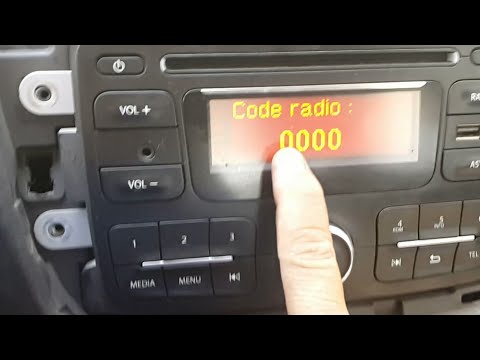
In this tutorial, you will learn how to find and enter the unlock code for the radio in the Dacia Dokker, a very simple operation necessary after replacing the battery. The code is usually found with the various documents provided at purchase, but if lost, it can be retrieved through various online services. These services require the serial number of the radio, which is located on the label on the top side of the unit. Once you have the unlock code, you can turn on the radio and enter it by repeatedly pressing the "1", "2", "3", and "4" buttons, and save the setting with the "6" button. by ScegliAuto More videos
|
|
For advertising on this site Write to info@scegliauto.com
ScegliAuto is not responsible for any inaccuracy of the data in the lists. To report any inaccuracy or your business (if you own the business in question), please write to info@scegliauto.com
Number of seconds to generate the page: 0.022
(c) ScegliAuto 2026 - info@scegliauto.com - Privacy policy - About us VAT number: IT01247470535 |
