
|
Do it yourself
| |||
| ||||


Hyundai Bluelink not working? Reset the connection from the secret menu (2024-2025)
Model: Hyundai Kona
- Years:
2023, 2024, 2025, 2026
Video tutorial
This system is much more practical than the classic "disconnected battery", as it does not erase personal settings: turn on the ignition and switch on the FM radio. Press and hold the "setup" button until the "software update" screen appears. Set the volume to "7", press in the bottom right corner of the screen (above the radio bar) for at least 1 second. Set the volume to "3" and press in the same spot. Set the volume to "1" and press again. At this point, a keyboard will appear to enter the code, which seems to be 2400: this is the alert for authorised personnel. Go to "connected car services" and then press "network restart" and confirm "reset all settings". This will restart the car's modem from scratch and the Bluelink connection will start working again. This operation must be performed in an area covered by mobile network; after the reset, it may take a few minutes to reconnect.
Posted on 20 November 2026 by ScegliAuto
Related tutorials
Hyundai Kona
(2023-2026 /
MK 2)
In this video we see how the MyCharge app works for a Hyundai Kona-e. This is an application designed by Hyundai for those who rightly ask themselves…

Hyundai Kona
(2023-2026 /
MK 2)
Today we will explain how to reset the tire pressure warning light on a 2025 Hyundai Kona vehicle. Press the menu button on the left side of the stee…

Hyundai Kona
(2023-2026 /
MK 2)
In this video, we will see how to reset the tire pressure on a Hyundai Kona: first, we need to check the pressure of all the tires according to the r…
ScegliAuto offers an extensive international collection of automotive tutorials available in 12 languages. Each guide combines instructional videos with original explanations written by experienced human editors, along with information about the car models covered.
Other guides you may be interested in
|
Where is the battery located on the Aprilia Scarabeo 250ie scooter?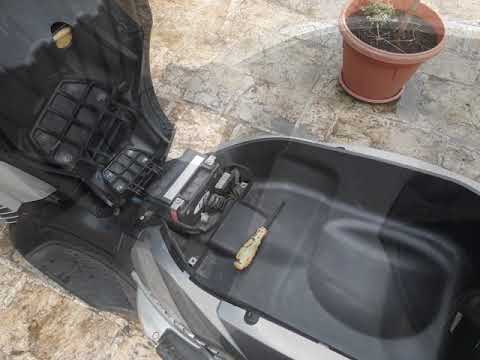
This video shows where the battery is located on the Aprilia Scarabeo 250ie scooter and how to proceed if you need to replace it. As shown, it is located beneath the seat. To access and replace it, first open the seat, then remove the plastic cover by unscrewing the relevant screws with a cross-head screwdriver. Next, disconnect both terminals, starting with the negative, remove the battery from its housing, and install the new replacement following the reverse procedure. by ScegliAuto More videos
|
|
For advertising on this site Write to info@scegliauto.com
ScegliAuto is not responsible for any inaccuracy of the data in the lists. To report any inaccuracy or your business (if you own the business in question), please write to info@scegliauto.com
Number of seconds to generate the page: 0.124
(c) ScegliAuto 2026 - info@scegliauto.com - Privacy policy - About us VAT number: IT01247470535 |
