
|
Do it yourself
| |||
| ||||


How to Replace the Key Fob Battery on an Infiniti QX60
Model: Infiniti QX60
L50
- Years 2013-2020
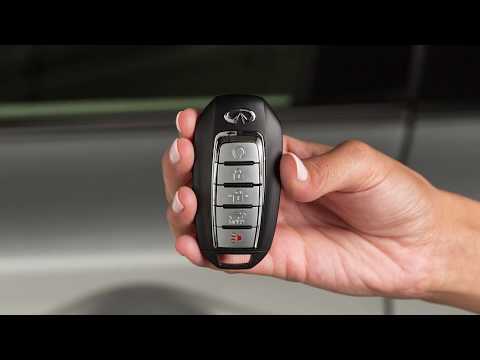
In this quick video tutorial, learn how to easily and quickly replace the battery in an Infiniti QX60 key fob. First, extract the physical key by sliding the release clip and pulling it from the bottom of the fob. Now, using a small flathead screwdriver, pry open the fob in two halves. Once open, you can see the old battery that needs to be removed. Using the screwdriver, take out the old battery and replace it with a new one, then finally close the fob. The key fob battery is a CR2032 model.
Updated on 15 May 2026 by ScegliAuto
Video tutorial
Related tutorials
Infiniti QX60
(2013-2020 /
L50)
In this tutorial we can see how to reprogram the remote control of the Infiniti QX60, an extremely simple and fast operation, to be carried out for e…
Infiniti QX60
(2013-2020 /
L50)
To replace the battery in the key fob for an Infiniti QX60, slide the key out from the top of the device to pry it open. This will allow you to separ…

Infiniti QX60
(2013-2020 /
L50)
If you own an Infiniti QX60 and want to replace the battery inside the car key yourself, all you need to do is read the following guide and follow th…
Other guides you may be interested in
|
How to Replace the External Wing Mirror on a Ford C MAX
In the event of a breakage, it will be necessary to replace the external wing mirror on the 2011 Ford C MAX. This operation is easily performed independently. Start by removing the internal cover of the mirror with a plastic lever. Then, use a socket wrench to remove the securing pins. Once the pins are removed, you can take off the mirror, but not before disconnecting the power connectors. Then proceed to fit the new mirror. First, connect the connectors and then secure the mirror to its housing with the pins. Refit the plastic cover and test the operation of the electric mirror using the controls. by ScegliAuto More videos
|
|
For advertising on this site Write to info@scegliauto.com
ScegliAuto is not responsible for any inaccuracy of the data in the lists. To report any inaccuracy or your business (if you own the business in question), please write to info@scegliauto.com
Number of seconds to generate the page: 0.174
(c) ScegliAuto 2026 - info@scegliauto.com - Privacy policy VAT number: IT01247470535 |
