
|
Do it yourself
| |||
| ||||


How to Reset the 4WD Light on an Isuzu D-Max?
Model: Isuzu Isuzu D Max
Rt50, Rt85
- Years:
2011, 2012, 2013, 2014, 2015, 2016, 2017, 2018, 2019, 2020, 2021, 2022
Video tutorial
The light identified with the 4WD symbol refers to the four-wheel drive function of the vehicle in question, the Isuzu D-Max. If this system malfunctions and it is only an occasional and temporary fault, likely due to a false electronic contact, you can attempt a reset as explained here: when you turn on the instrument panel, you will see the message 'Check 4WD' related to the previously mentioned problem. To turn it off, press and hold the three buttons located next to each other on the dashboard for a few seconds, and you will notice the reset occurring.
Posted on 18 March 2026 by ScegliAuto
Related tutorials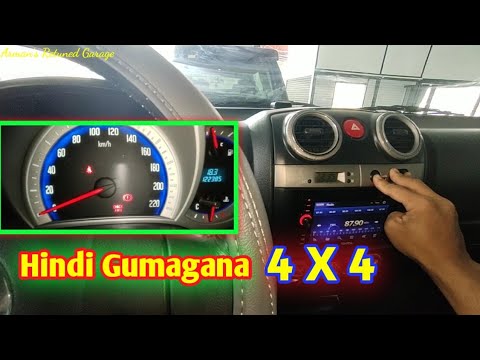
Isuzu Isuzu D Max
(2011-2024 /
Rt50, Rt85)
If the "Check 4WD" light has illuminated in your Isuzu D-Max pickup, it indicates a malfunction in the all-wheel-drive management system. The problem…

Isuzu Isuzu D Max
(2011-2024 /
Rt50, Rt85)
This article outlines the procedure to reset the 4WD check light on an Isuzu D Max if it remains illuminated after vehicle maintenance. No tools or s…

Isuzu Isuzu D Max
(2011-2024 /
Rt50, Rt85)
Today, we will explain how to reset the four-wheel drive system on an Isuzu D Max vehicle. There is no universal reset button for the 4WD system, but…
Other guides you may be interested in
|
How to Set the Time in an Audi A4?
In this tutorial, you will see how to set the time in an Audi A4, a very simple and quick operation to perform after replacing the battery or when the time changes. First, insert the key and turn on the instrument cluster. Then, press the "SETUP" button located on the center console. Next, press the upper left arrow button, navigate to the "Time" option, and use the central knob to adjust the clock. Finally, set any necessary formats and save by returning to the main screen. by ScegliAuto More videos
|
|
For advertising on this site Write to info@scegliauto.com
ScegliAuto is not responsible for any inaccuracy of the data in the lists. To report any inaccuracy or your business (if you own the business in question), please write to info@scegliauto.com
Number of seconds to generate the page: 0.034
(c) ScegliAuto 2026 - info@scegliauto.com - Privacy policy VAT number: IT01247470535 |
