
|
Do it yourself
| |||
| ||||


How do you set the time on the Iveco Daily 2021?
Model: IVECO Daily
MK 5
- Years 2014-2024
Leaving aside the reasons why it is necessary to set the time, let's move on to describe how to do it independently, since it is not a complicated operation: Turn on the instrument panel, press the Mode button, located at the bottom of the dashboard, to the right of the steering wheel, and access the Settings, then choose the Date and Time option and set the Hours and then the minutes with the arrow keys. Everything done must be saved by pressing the Mode button again. To ensure the success of the operation, turn off and on the aforementioned panel.
Posted on 7 November 2024 by ScegliAuto
Video tutorial
Related tutorials
IVECO Daily
(2014-2024 /
MK 5)
One of the most well-known light commercial vehicles is the Iveco Daily, and we can see the video presentation of it uploaded here. The information a…

IVECO Daily
(2014-2024 /
MK 5)
As much as a car radio can be technologically updated, it is possible, in the aftermarket, to replace it with newly launched and innovative models. F…

IVECO Daily
(2014-2024 /
MK 5)
To adjust the clock of the Iveco Daily, you need to turn on the instrument panel by inserting the ignition key into the corresponding slot: once the …
Other guides you may be interested in
|
How to Replace the Front Bumper of a Fiat Panda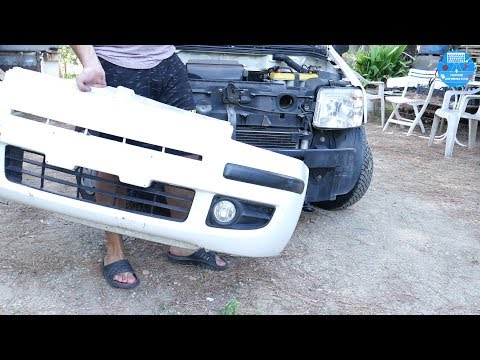
Start by releasing the bonnet from the latch to lift and secure it with the prop rod. This way, you can unscrew the screws securing the top part of the front bumper. Next, remove the screws securing the inner wing to the rear part of the bumper. Now, unscrew the screws anchoring the bottom part of the bumper to the lower body of the vehicle. Finally, extract the bumper and reverse the steps described for reassembling the various components. by ScegliAuto More videos
|

|
For advertising on this site Write to info@scegliauto.com
ScegliAuto is not responsible for any inaccuracy of the data in the lists. To report any inaccuracy or your business (if you own the business in question), please write to info@scegliauto.com
Number of seconds to generate the page: 0.119
(c) ScegliAuto 2026 - info@scegliauto.com - Privacy policy VAT number: IT01247470535 |
