
|
Do it yourself
| |||
| ||||


How to manually set the time on the Kia Sedona
Model: Kia KIA Various
To manually change the time displayed on your 2016 Kia Sedona just follow a few simple steps that we will describe in our new mini guide. First insert the key and turn on the ignition first and then the radio. Press the "Setup" button and enter the settings of the car radio itself. Click on the "Clock" icon and at this point manually change the hour and minute digits using the arrows displayed on the screen. Once done, go back to save your changes and exit the menu to complete the operation.
Posted on 5 November 2022 by ScegliAuto
Video tutorial
Related tutorials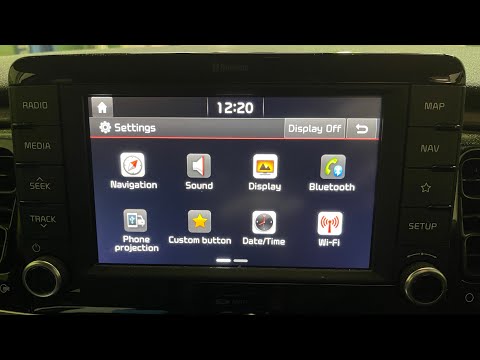
Kia KIA Various
In this new mini guide, we will discover how to manually and correctly set the time on your Kia Rio fourth series (year 2016-2023). First, insert the…

Kia KIA Various
In this tutorial we can see how to adjust the time in the KIA K4, an extremely simple and quick operation, to be carried out for example after replac…

Kia KIA Various
Today we will explain how to set the time on the new generation Kia's onboard computer. To perform this operation, we need to turn on the instrument …
Other guides you may be interested in
|
How to Remove the Dome Light of an Audi Q5
Let's see how to remove and replace the bulbs located in the dome light of the headliner on an Audi Q5. Use a screwdriver or a plastic trim tool to pry between the dome light cover and its perimeter (without breaking the plastic). Pull the bulbs to be replaced out of the dome light. Replace the damaged bulbs with new ones (same size and voltage). Reinstall the cover in its housing along with the associated parts. Perform the same operation for the other dome lights located in the headliner. Test the light's proper operation at the end of the installation. by ScegliAuto More videos
|
|
For advertising on this site Write to info@scegliauto.com
ScegliAuto is not responsible for any inaccuracy of the data in the lists. To report any inaccuracy or your business (if you own the business in question), please write to info@scegliauto.com
Number of seconds to generate the page: 0.118
(c) ScegliAuto 2026 - info@scegliauto.com - Privacy policy VAT number: IT01247470535 |
