
|
Do it yourself
| |||
| ||||


How to Manually Set the Time on the Kia Sedona
Model: Kia KIA Various
Video tutorial
To manually change the time displayed on your 2016 Kia Sedona, follow these simple steps outlined in this mini guide. First, insert the key and turn on the ignition, then the radio. Press the "Setup" button and enter the radio settings. Click on the "Clock" icon and manually adjust the hour and minute digits using the arrows displayed on the screen. Once finished, go back to save the changes and exit the menu to complete the operation.
Updated on 23 June 2026 by ScegliAuto
Related tutorials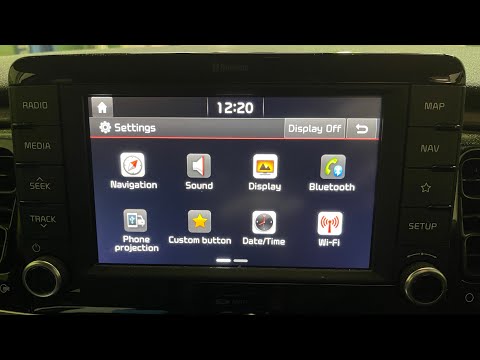
Kia KIA Various
In this mini guide, discover how to manually and correctly set the time on your Kia Rio fourth generation (2016-2023). First, insert the key and turn…

Kia KIA Various
Today we will explain how to set the time on the new generation Kia's onboard computer. To perform this operation, we need to turn on the instrument …

Kia KIA Various
In this tutorial we can see how to adjust the time in the KIA K4, an extremely simple and quick operation, to be carried out for example after replac…
Other guides you may be interested in
|
How to lower the rear seats in the Peugeot 206?
In this tutorial, you will see how to lower the rear seats in the Peugeot 206, a very simple and quick operation, for example, if you need more space in the boot. First, open both the doors and the tailgate, then unclip the seat base and position it vertically. Next, remove the horizontal partition, locate the release levers at the ends of both seatbacks, and, by operating them, lower the seatbacks. To reassemble everything, simply follow the reverse procedure. by ScegliAuto More videos
|
|
For advertising on this site Write to info@scegliauto.com
ScegliAuto is not responsible for any inaccuracy of the data in the lists. To report any inaccuracy or your business (if you own the business in question), please write to info@scegliauto.com
Number of seconds to generate the page: 0.295
(c) ScegliAuto 2026 - info@scegliauto.com - Privacy policy VAT number: IT01247470535 |
