
|
Do it yourself
| |||
| ||||


How to reset the service on the Mazda 3
Model: Mazda 3
MK 2, BL
- Years 2009-2013
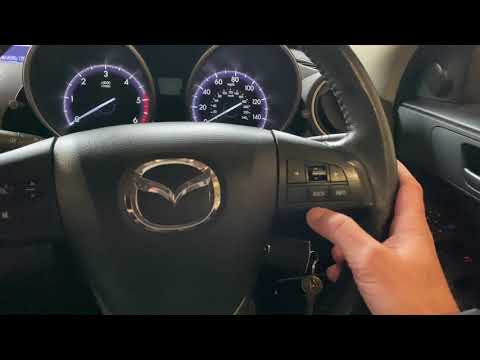
To reset the service on the Mazda 3, start by turning on the instrument panel without starting the engine. Press the "info" button on the right side of the steering wheel until a list appears, then press the "enter" button down to the "maintenance" option, press the "enter" button, go to the "service two" option, press the "enter" button, press it again, go to the "set" option, press the "enter" button, go to the "distance" option, press the "enter" button again, press it again to confirm the new mileage, and now the new mileage with the days until the next service will appear; finally, you can turn off the instrument panel, turn it back on, go to the "maintenance" option, press the "enter" button, go to the "service two" option, press the "enter" button and check if the mileage has been updated.
Updated on 13 August 2026 by ScegliAuto
Video tutorial
Related tutorials
Mazda 3
(2019-2026 /
MK 4, BP)
In this video, we see how to reset the service light on a Mazda 3 MK4: turn on the ignition, and select the "information" option from the menu using …
Mazda 3
(2009-2013 /
MK 2, BL)
In this brief and simple guide, learn the procedure to reset the service light for the routine oil change on the second series Mazda 3. First, get in…

Mazda 3
(2019-2026 /
MK 4, BP)
To reset the service light on a Mazda 3, get in the vehicle and turn on the ignition or start the multimedia system. Use the central knob near the ge…
Other guides you may be interested in
|
How to Bleed the Clutch on a Renault Clio?
To bleed the clutch on a Renault Clio, open the bonnet to access the components located in the engine bay: here, you will need to undo the screws that secure the battery in its housing, the intake manifold, and the coolant reservoir. This will allow you to locate the pipe through which the brake fluid flows: by inserting the other end of the pipe into a container, you can press the clutch pedal to expel all the fluid until it fills the container. by ScegliAuto More videos
|

|
For advertising on this site Write to info@scegliauto.com
ScegliAuto is not responsible for any inaccuracy of the data in the lists. To report any inaccuracy or your business (if you own the business in question), please write to info@scegliauto.com
Number of seconds to generate the page: 0.068
(c) ScegliAuto 2026 - info@scegliauto.com - Privacy policy VAT number: IT01247470535 |
