
|
Do it yourself
| |||
| ||||


Where to Find the OBD Port on the Mercedes Sprinter 2
Model: Mercedes Sprinter
MK 2, W906
- Years 2006-2018
If you want to find the OBD port on your second generation Mercedes Sprinter, then this guide is all you need. First, open the passenger door and enter the vehicle. Next, focus on the lower area of the glove compartment and locate a plastic cover with a small lightning bolt symbol. Remove this cover with your hands, then take off the protective cap to gain access to the OBD port you were looking for. Finally, connect a diagnostic tool if necessary.
Posted on 21 April 2026 by ScegliAuto
Video tutorial
Related tutorials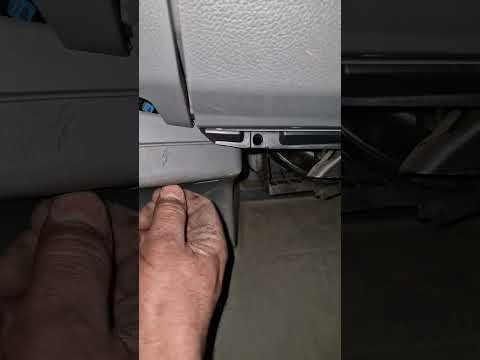
Mercedes Sprinter
(2006-2018 /
MK 2, W906)
In this mini guide, discover where the OBD port is located on your 2013 Mercedes Sprinter. First, ensure the vehicle is turned off. Then, reach the p…

Mercedes Sprinter
(1995-2006 /
MK 1, W901)
In this new guide, you will find a description of the various steps necessary to quickly locate the OBD port inside your first-generation Mercedes Sp…

Mercedes Sprinter
(2006-2018 /
MK 2, W906)
Thanks to the instructions described in the following guide dedicated to all of you who own a 2018 Mercedes Sprinter, you will finally be able to ind…
Other guides you may be interested in
|
How to Reset the Tyre Pressure Light on the Opel Grandland X
While driving, if you notice the tyre pressure warning light coming on, first check the actual inflation pressure of the tyres and, if necessary, restore the pressures recommended by the manufacturer. After restoring the correct pressures, you need to reset the warning light that has illuminated on the instrument cluster. To do this, locate the reset button on the lower central console. Press this button and hold it down for at least 3 seconds, after which the low pressure indication will turn off. by ScegliAuto More videos
|
|
For advertising on this site Write to info@scegliauto.com
ScegliAuto is not responsible for any inaccuracy of the data in the lists. To report any inaccuracy or your business (if you own the business in question), please write to info@scegliauto.com
Number of seconds to generate the page: 0.061
(c) ScegliAuto 2026 - info@scegliauto.com - Privacy policy VAT number: IT01247470535 |
