
|
Do it yourself
| |||
| ||||


How to install a display in the Mini Cooper?
Model: Mini Mini
Countryman2, F60
- Years 2017-2023
In this tutorial, we can see how to install a display in the Mini Cooper, which will completely replace the large central instrument panel. Let's start by removing the bottom of both cup holders, then unscrew the two screws that have just been released with a Torx T20 key. We continue by removing the screw located just behind the gear lever, separate the entire block of the central tunnel, and unscrew the additional indicated screw. At this point, we can remove the frame of the instrument panel by levering along the joint, remove the upper ventilation grille, and disassemble the panel itself. To install the replacement and reassemble everything, just follow the reverse procedure.
Posted on 12 November 2023 by ScegliAuto
Video tutorial
Related tutorials
Mini
(2007-2014 /
R56, R57, R55)
Good morning, today's goal is to replace the battery of our Mini Cooper key. Let's start by unhooking and removing the back cover of the key, leverag…

Mini
(2001-2007 /
R52, R50, R53)
In this guide, we will explore the instructions and main steps on how to install the cabin heating radiator on the Mini Cooper. First, let's get insi…

Mini
(2017-2023 /
Countryman2, F60)
To be able to set the Mini Cooper clock, turn on the instrument panel, so that you can access the menu on the central display: once the "Menu" item h…
Other guides you may be interested in
|
Frequently Asked QuestionsHow to Remove the Fuel Pump on Toyota Verso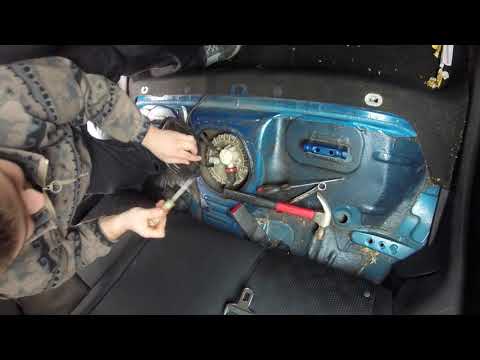
Let's see how to remove the fuel pump on a Toyota Verso. First, disconnect the battery cables, then remove the rear seat from the car. You will find various wiring and a metal piece with screws; unscrew the securing screws of the metal cap and remove it. Wrap the entire perimeter of the metal panel with paper or an absorbent cloth, then, using a screwdriver and hammer, unscrew the large bolt around the pump. Disconnect the power terminals and the fluid circulation tubes. Extract the fuel pump. To reassemble, proceed in reverse order. by ScegliAuto More videos
|

|
For advertising on this site Write to info@scegliauto.com
ScegliAuto is not responsible for any inaccuracy of the data in the lists. To report any inaccuracy or your business (if you own the business in question), please write to info@scegliauto.com
Number of seconds to generate the page: 0.128
(c) ScegliAuto 2026 - info@scegliauto.com - Privacy policy VAT number: IT01247470535 |
