
|
Do it yourself
| |||
| ||||


How to reset the service in the Opel Corsa?
Model: Vauxhall Corsa
Corsa D
- Years 2006-2014
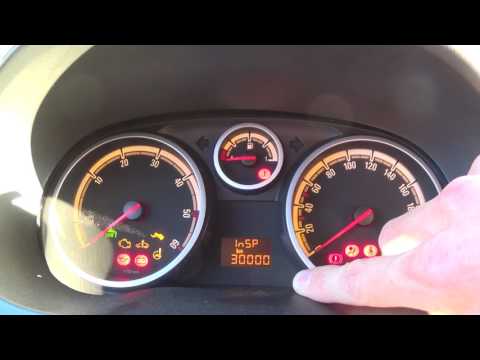
In this tutorial we can see how to reset the service in the Opel Corsa, an extremely simple and quick operation, to be carried out only once all scheduled maintenance work has been completed. Let's start by going inside the cabin, then insert the key but leave it in the first position. Then press the button located in the center of the dashboard, turn on the instrument panel at the same time, and keep the button pressed until a series of dashes appear on the display. To complete the procedure, simply restart the vehicle.
Posted on 21 February 2025 by ScegliAuto
Video tutorial
Related tutorials
Vauxhall Corsa
(2006-2014 /
Corsa D)
In this tutorial, we will see how to reset the service on an Opel Corsa, a very simple and quick operation to be carried out only after completing al…

Vauxhall Corsa
(2014-2019 /
Corsa E)
In this tutorial, we will see how to reset the service light in an Opel Corsa, a very simple and quick operation, to be performed only after completi…
Vauxhall Corsa
(2006-2014 /
Corsa D)
Learn how to reset the maintenance service light on an Opel Corsa. To reset the maintenance light: turn on the ignition, use the button located at th…
Other guides you may be interested in
|
How to Bleed the Clutch on a Renault Clio?
To bleed the clutch on a Renault Clio, open the bonnet to access the components located in the engine bay: here, you will need to undo the screws that secure the battery in its housing, the intake manifold, and the coolant reservoir. This will allow you to locate the pipe through which the brake fluid flows: by inserting the other end of the pipe into a container, you can press the clutch pedal to expel all the fluid until it fills the container. by ScegliAuto More videos
|
|
For advertising on this site Write to info@scegliauto.com
ScegliAuto is not responsible for any inaccuracy of the data in the lists. To report any inaccuracy or your business (if you own the business in question), please write to info@scegliauto.com
Number of seconds to generate the page: 0.757
(c) ScegliAuto 2026 - info@scegliauto.com - Privacy policy VAT number: IT01247470535 |
