
|
Do it yourself
| |||
| ||||


How to Reset the Service Light on the 2024 Opel Movano
Model: Vauxhall Movano
MK 3
- Years:
2021, 2022, 2023, 2024, 2025, 2026
Video tutorial
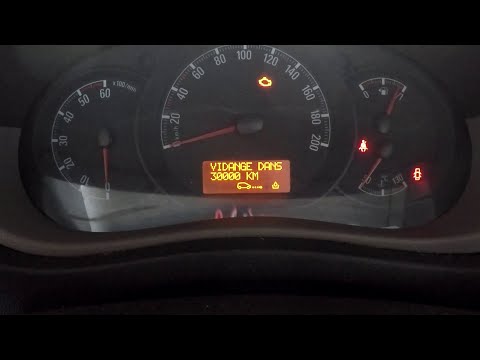
The work vehicle from Opel mentioned here follows the same rules as any other motor vehicle, namely being subjected to periodic maintenance regarding the engine and related parts. The service light reminds us of this by illuminating on the instrument panel, so you will either go to a workshop or, as many prefer, handle it yourself by resetting the light as specified here: with the instrument panel on, scroll through the menu options using the arrow buttons on the right side of the steering wheel, select "Service Intervals" and while holding down the Down Arrow button, clear the alert.
Posted on 20 March 2026 by ScegliAuto
Related tutorials
Vauxhall Movano
(2010-2021 /
MK 2, Movano B)
The Opel Movano is the goods transport vehicle shown in the attached tutorial video, where the engine oil has been changed along with the oil and air…
Vauxhall Movano
(2010-2021 /
MK 2, Movano B)
After changing the engine oil in the Opel Movano, you need to reset the control system that alerts you to the need for maintenance. Sit in the driver…

Vauxhall Movano
(2021-2026 /
MK 3)
In this new mini guide for all of you who own a 2024 Opel Movano (third series), we will describe the various steps you need to take if you want to l…
Other guides you may be interested in
|
Where are the fuses located on the Renault Laguna?
On the Renault Laguna, the fuses are located inside the fuse boxes installed in the vehicle: in this car model, you will find two boxes for containing the fuses. The first is in the fuse box on the left side of the dashboard, accessible by opening the driver's door: here you will find the fuses for the windscreen wipers, fog lights, horn, etc. The second box is located on the right side of the engine compartment: here you will find the fuses for the dipped headlights, radiator fan, alternator, etc. by ScegliAuto More videos
|
|
For advertising on this site Write to info@scegliauto.com
ScegliAuto is not responsible for any inaccuracy of the data in the lists. To report any inaccuracy or your business (if you own the business in question), please write to info@scegliauto.com
Number of seconds to generate the page: 0.035
(c) ScegliAuto 2026 - info@scegliauto.com - Privacy policy VAT number: IT01247470535 |
