
|
Do it yourself
| |||
| ||||


RAM 3500 - Headlight bulbHeadlight Bulb RAM 3500 (2009-2019 / ds, dj, mk 4) RAM 3500 (2009-2019 / DS, DJ, MK 4) How to replace the headlight bulb of the Dodge RAM 3500. Today we will see the instructions that will allow us to disassemble and replace the headlight bulb of the Dodge RAM 3500. First, let's open the vehicle's hood …Read all… Posted on 11 December 2025 by ScegliAuto  RAM 3500 (2009-2019 / DS, DJ, MK 4) Replacing the Headlight Bulbs on a Ram 3500 In this video tutorial, learn how to replace a front headlight on a Ram 3500, model produced from 2009 to 2019. Start by opening the hood and removing the …Read all… Posted on 26 August 2026 by ScegliAuto  RAM 3500 (2009-2019 / DS, DJ, MK 4) How to Replace the Headlight Bulb on a Ram 3500 To replace the headlight bulb on this vehicle model, follow the instructions below and refer to the tutorial video. First, remove the clips securing the inner …Read all… Posted on 29 July 2026 by ScegliAuto 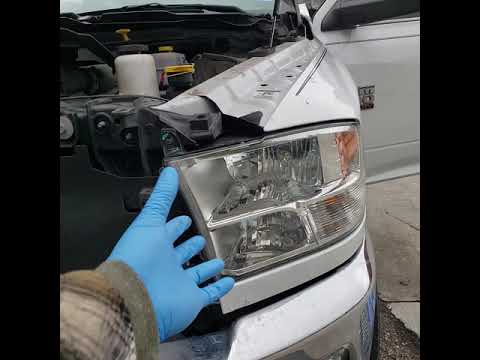 RAM 3500 (2009-2019 / DS, DJ, MK 4) Replace the Headlight Bulb on the RAM 3500 MK4 In this video tutorial, you will learn how to remove and replace the headlight bulb on the 2018 RAM 3500, fourth generation. First, open the hood and start by …Read all… Posted on 21 June 2026 by ScegliAuto Shocks (1) Car stereo (2) Battery (3) Key (7) Checks and maintenance (1) Brake rotors (5) Headlight (6) Tail light (3) Fog lights (1) Air filter (5) Cabin air filter (3) Fuel filter (3) Diesel fuel filter (3) Clutch (1) Light bulb (1) Side marker bulb (1) Headlight bulb (4) Tail light bulb (1) Transmission fluid (1) Engine oil (7) Brake pads (2) Pump (1) Car door (1) Wheel (1) Fuse box (5) Side mirror (1) AdBlue warning light (1) Warning light – error code (3) Service warning light (11) Windshield wipers (2) |
How to Change the Date and Time on the Renault Scenic
In this guide, you will find instructions to change the date and time on the Renault Scenic in simple steps. First, get in the vehicle and turn on the instrument panel; then navigate to the vehicle settings using the knob, selecting the clock menu, as shown in the video. At this point, you can modify the time and date, also selecting the desired format; finally, exit the settings menu to save the changes, allowing you to adjust the time at any moment! by ScegliAuto More videos
|
|
For advertising on this site Write to info@scegliauto.com
ScegliAuto is not responsible for any inaccuracy of the data in the lists. To report any inaccuracy or your business (if you own the business in question), please write to info@scegliauto.com
Number of seconds to generate the page: 0.008
(c) ScegliAuto 2026 - info@scegliauto.com - Privacy policy - About us VAT number: IT01247470535 |
