
|
Do it yourself
| |||
| ||||



Disassembly and repair of the frame of the Renault Clio IV console
Model: Renault Clio
Clio IV, Clio 4, MK 4
- Years:
2012, 2013, 2014, 2015, 2016, 2017, 2018, 2019
Video tutorial
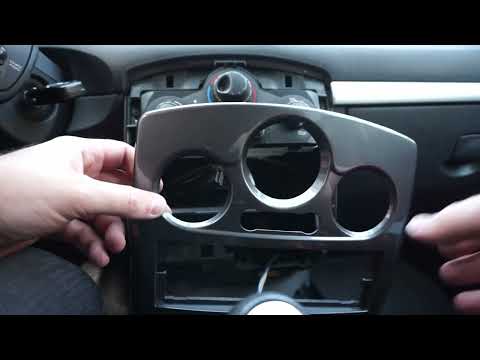
In this video we see how to disassemble and repair the frame of the console of a Renault Clio IV: the chrome frame around the controls of the console or the GPS screen may crack or lose color: the official replacement costs about 400 euros, but it can be repaired at home without tools. The frame is fixed only with clips: we gently pull with our hands, without using screwdrivers, starting from the corners: be careful because it is a material that may have become fragile over time. There are several options for repairs: covering with an adhesive film, black or gray, but it does not always adhere well to the damaged chrome. It is advisable to paint directly, sanding the chrome surface to remove residues and painting with a matte spray (perhaps gray, to match the steering wheel), at a cost of 10/12 euros for the spray can of paint.
Posted on 28 July 2025 by ScegliAuto
Related tutorials
Renault Clio
(2012-2019 /
Clio IV, Clio 4, MK 4)
Today, you will learn how to independently remove the Easylink display from the 2019 Renault Clio. The display removal is related to the removal of t…
Renault Clio
(2005-2013 /
Clio 3, MK 3, Clio III)
As seen in this tutorial, replacing the bulbs in the central console of a Renault Clio is a very simple operation. First, ensure the vehicle is turne…
Renault Clio
(2005-2013 /
Clio 3, MK 3, Clio III)
In this video, see how to repair the cabin fan of a Renault Clio third series. First, disconnect the two battery terminals; then access the inside of…
Other guides you may be interested in
|
Frequently Asked QuestionsHow to Reset the AdBlue Warning Light on a Peugeot Boxer
To reset the AdBlue system on a 2018 Peugeot Boxer, follow these steps: Start the engine and ensure the vehicle is parked in a well-ventilated area. Locate the "MENU" button on the dashboard or steering wheel controls. Press and hold the "MENU" button until the menu options appear on the display. Use the arrow buttons or scroll wheel to access the "Vehicle Settings" or "Settings" menu. Select the "AdBlue" or "AdBlue System" option. Look for the "Recharge" or "Reset" option in the AdBlue menu. Once you find the reset option, select it and confirm your choice when prompted. The system will be reset, and a confirmation message may appear on the display. Turn off the engine and wait a few seconds. Restart the engine and check that the AdBlue system has been reset. by ScegliAuto More videos
|
|
For advertising on this site Write to info@scegliauto.com
ScegliAuto is not responsible for any inaccuracy of the data in the lists. To report any inaccuracy or your business (if you own the business in question), please write to info@scegliauto.com
Number of seconds to generate the page: 0.017
(c) ScegliAuto 2026 - info@scegliauto.com - Privacy policy VAT number: IT01247470535 |
