
|
Do it yourself
| |||
| ||||


Disassembly of the Renault Scenic instrument panel
Model: Renault Scenic
Scenic 2, MK 2
- Years 2003-2009
In this video tutorial we will see how to remove the digital instrument cluster of a second series Renault Scenic, following the steps illustrated below. First of all we get on board the car and begin to remove the plastic bulkhead that we find in the picture, leveraging something thin; remove the plastic frames and then disconnect all the electrical connectors that we find at the top, as shown in the video. At this point we are going to unscrew all the torx screws fixing the panel and we are going to gently remove our instrument panel display, without breaking it!
Posted on 4 December 2021 by ScegliAuto
Video tutorial
Related tutorials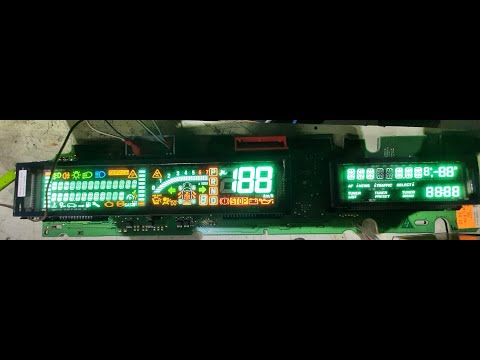
Renault Scenic
(2003-2009 /
Scenic 2, MK 2)
In order to replace the Renault Scenic instrument cluster bulb, you need to completely disassemble the instrument cluster, removing it from inside it…

Renault Scenic
(2009-2015 /
MK III, Scenic III, Scenic 3, MK 3)
Learn how to adjust the brightness of the instrument cluster on the Renault Scénic 3, useful if you want to dim or increase the brightness to make th…

Renault Scenic
(2009-2015 /
MK III, Scenic III, Scenic 3, MK 3)
On many new generation vehicles, it is possible to customize the display interface of the instrument cluster or the onboard computer to have a person…
Other guides you may be interested in
|
How to Replace the Window Regulator on the BMW X3
Replacing the window regulator mechanism requires removing the door panel and the aluminum underpanel to access the mechanism itself. Remove the motor and loosen the glass retaining clips to complete the removal of the window regulator. Attach the motor to the new mechanism and insert the assembled unit back into the door, securing it with the appropriate nuts. Then, insert the glass and tighten the clips, completing the installation by connecting the motor's power connector and performing a functionality check before reassembling all other components. by ScegliAuto More videos
|
|
For advertising on this site Write to info@scegliauto.com
ScegliAuto is not responsible for any inaccuracy of the data in the lists. To report any inaccuracy or your business (if you own the business in question), please write to info@scegliauto.com
Number of seconds to generate the page: 0.054
(c) ScegliAuto 2026 - info@scegliauto.com - Privacy policy VAT number: IT01247470535 |
