
|
Do it yourself
| |||
| ||||


|
Model: Suzuki Gsx S 1000
To reset the Service light on the Suzuki GSX S1000, turn on the instrument panel by inserting the ignition key into the ignition switch: once the panel is on, navigate through the menu that appears, selecting the "SERVICE" option. At this point, a screen will appear where you can modify the date of the next service and the maintenance interval. Once these two parameters have been changed, you will notice that the Service light has disappeared from the instrument panel, which can then be turned off.
Updated on 17 August 2026 by ScegliAuto
Video tutorial
Related tutorials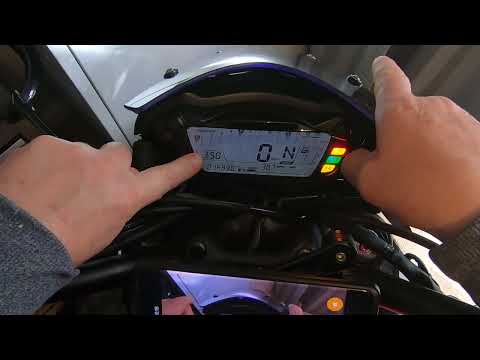
Gsx S 1000
In this tutorial, you will see how to set the time on the Suzuki GSX-S1000, a very simple and quick operation to perform after disconnecting the batt…

Gsx S 1000
Replacing the motor oil in the Suzuki GSX-S1000, as we can see in this tutorial, is an extremely simple and quick operation. First of all, make sure …

Gsx S 1000
In this tutorial, we will see how to change the engine oil in the Suzuki GSX-S1000, a very simple and quick operation. First, wait until the engine i…
|
How to Replace the Battery in a Yamaha FZ6?
Replacing the battery in the Yamaha FZ6, as shown in this tutorial, is a very simple and quick operation. First, ensure that the key is not inserted, then remove the rider's seat and, using a 10mm socket spanner, loosen the bolt on the tank hinge. Next, unscrew both the front bolts and the fairing mounting bolts, lift the entire tank, and disconnect both terminals starting with the negative. At this point, you can remove the upper plastic plate, take the battery out of its housing, and fit the replacement. by ScegliAuto More videos
|
|
For advertising on this site Write to info@scegliauto.com
ScegliAuto is not responsible for any inaccuracy of the data in the lists. To report any inaccuracy or your business (if you own the business in question), please write to info@scegliauto.com
Number of seconds to generate the page: 0.004
(c) ScegliAuto 2026 - info@scegliauto.com - Privacy policy VAT number: IT01247470535 |
