
|
Do it yourself
| |||
| ||||


How to deactivate the Start & Stop system on the Volkswagen Golf VII
Model: Volkswagen Golf
Golf VII, MK 7, Golf 7
- Years 2012-2019
Let's see how to deactivate the start & stop function on a Volkswagen Golf 7 and restyling 7.5. We will need a "extension with memory" module that we can find on AliExpress with code 1005008320082074 at a price of 17.99 + delivery costs of 0.74 euro. We open the glove compartment under the air conditioning; to access it better, we delicately remove the side covers of the central tunnel. The panel contains the driving mode buttons; we disconnect the electrical connector from the back of the start & stop button; we connect the "extension" module between the original connector and the button; it is a simple male-female connection. We fix the module in a point where it does not obstruct the gear lever or other mechanisms. We reassemble the button block and the side covers. The additional module ensures that the start & stop system starts in the state in which we left it at the previous shutdown. It is a completely reversible system.
Posted on 2 October 2025 by ScegliAuto
Video tutorial
Related tutorials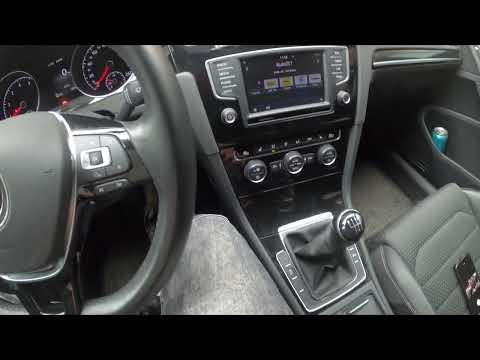
Volkswagen Golf
(2012-2019 /
Golf VII, MK 7, Golf 7)
In this video, we see how to activate or deactivate the start & stop system on the Volkswagen Golf 7. The procedure is very simple as next to the gea…

Volkswagen Golf
(2012-2019 /
Golf VII, MK 7, Golf 7)
In this short guide, we will see the instructions on how to deactivate and activate the Start&Stop system of the Volkswagen Golf. First, let's get in…

Volkswagen Golf
(2019-2026 /
Golf 8, MK 8, Golf Viii)
In this article, we will see how to deactivate the start and stop system of the Volkswagen Golf 8 in order to preserve the battery. The procedure is …
Other guides you may be interested in
|
Frequently Asked QuestionsHow to Replace the External Wing Mirror on a Ford C MAX
In the event of a breakage, it will be necessary to replace the external wing mirror on the 2011 Ford C MAX. This operation is easily performed independently. Start by removing the internal cover of the mirror with a plastic lever. Then, use a socket wrench to remove the securing pins. Once the pins are removed, you can take off the mirror, but not before disconnecting the power connectors. Then proceed to fit the new mirror. First, connect the connectors and then secure the mirror to its housing with the pins. Refit the plastic cover and test the operation of the electric mirror using the controls. by ScegliAuto More videos
|

|
For advertising on this site Write to info@scegliauto.com
ScegliAuto is not responsible for any inaccuracy of the data in the lists. To report any inaccuracy or your business (if you own the business in question), please write to info@scegliauto.com
Number of seconds to generate the page: 0.065
(c) ScegliAuto 2026 - info@scegliauto.com - Privacy policy VAT number: IT01247470535 |
