
|
Do it yourself
| |||
| ||||



How to Set the Clock on the Volkswagen Polo?
Model: Volkswagen Polo
6R, Polo V, MK V, Polo 5, MK 5
- Years:
2009, 2010, 2011, 2012, 2013, 2014, 2015, 2016, 2017
Video tutorial
On the Volkswagen Polo, to adjust the clock, turn on the instrument cluster by turning the appropriate key in the ignition lock: this will activate the cluster, and you can press the button with the clock icon, ensuring that the number indicating the hours starts flashing. You can then press the 0.0/SET button to change the hours; pressing the button with the clock icon again will cause the minutes to start flashing, and these can be adjusted using the same procedure.
Posted on 19 November 2026 by ScegliAuto
Related tutorials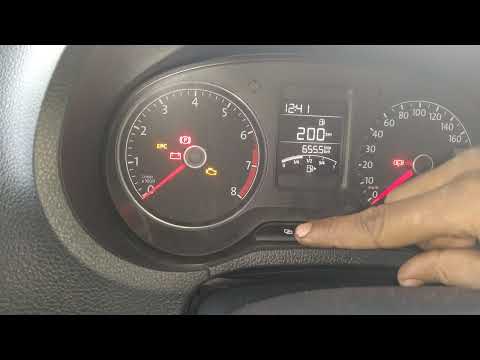
Volkswagen Polo
(2009-2017 /
6R, Polo V, MK V, Polo 5, MK 5)
To adjust the clock on the Volkswagen Polo, turn on the instrument cluster by rotating the key in the ignition switch. This will power up the cluster…

Volkswagen Polo
(2009-2017 /
6R, Polo V, MK V, Polo 5, MK 5)
You can adjust the clock on the Volkswagen Polo by turning on the instrument cluster, inserting the appropriate key into the ignition switch: this wi…

Volkswagen Polo
(2009-2017 /
6R, Polo V, MK V, Polo 5, MK 5)
On board the Volkswagen Polo, it will be possible to modify the clock by turning on the instrument panel, turning the key inside the corresponding ig…
ScegliAuto offers an extensive international collection of automotive tutorials available in 12 languages. Each guide combines instructional videos with original explanations written by experienced human editors, along with information about the car models covered.
Other guides you may be interested in
|
How to Set the Time and Date on the Toyota Yaris
In just a few simple steps, you will learn how to set the date and time on the Toyota Yaris by following the instructions below. First, get inside the vehicle and turn on the instrument panel; then go to the vehicle settings from the central display and select the clock option, as shown in the video. From here, you can set the time by adjusting the hours and minutes; if necessary, set the date and both formats, including automatic time via GPS, and finally exit the settings menu to save the changes made. by ScegliAuto More videos
|
|
For advertising on this site Write to info@scegliauto.com
ScegliAuto is not responsible for any inaccuracy of the data in the lists. To report any inaccuracy or your business (if you own the business in question), please write to info@scegliauto.com
Number of seconds to generate the page: 0.116
(c) ScegliAuto 2026 - info@scegliauto.com - Privacy policy - About us VAT number: IT01247470535 |
