
|
Do it yourself
| |||
| ||||


How to Reset the Radio on a Volkswagen?
Model: Volkswagen Volkswagen Various
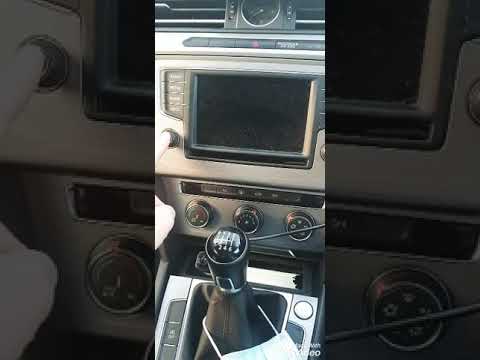
To reset the radio on a Volkswagen, first turn on the ignition by turning the key in the ignition switch: once the ignition is on, press and hold the buttons located at the top of the screen simultaneously. In particular, you need to hold the buttons for skipping tracks, along with the one with the speaker icon with the 'i': this will cause the screen to turn off and then automatically turn back on, allowing you to complete the reset.
Updated on 30 July 2026 by ScegliAuto
Video tutorial
Related tutorials
Volkswagen Volkswagen Various
To reset the Volkswagen car radio, you will need to remove the device from its housing: to do this, you can use a tool to pry off the central dashboa…
Volkswagen Volkswagen Various
If the radio fitted in your Volkswagen is experiencing serious and persistent software issues, you must perform the following reset procedure. Enter …

Volkswagen Volkswagen Various
To reset the radio on Volkswagen vehicles, you need to insert the ignition key into the corresponding slot: once the ignition is on, you can use the …
Other guides you may be interested in
|
Frequently Asked QuestionsWhere is the Spare Wheel in the Peugeot 5008?
This video shows where the spare wheel is located in the Peugeot 5008 and how to access it, useful in case of a puncture. As shown, the wheel is not in the usual boot compartment but underneath it, outside the vehicle. To free the wheel, first gather the tools provided, then open the boot, locate the small indicated hatch, and open it. Next, loosen the bolt just released using the large socket wrench enough to lower the wheel to the ground. by ScegliAuto More videos
|
|
For advertising on this site Write to info@scegliauto.com
ScegliAuto is not responsible for any inaccuracy of the data in the lists. To report any inaccuracy or your business (if you own the business in question), please write to info@scegliauto.com
Number of seconds to generate the page: 0.259
(c) ScegliAuto 2026 - info@scegliauto.com - Privacy policy VAT number: IT01247470535 |
