
|
Do it yourself
| |||
| ||||


Model: Aprilia Shiver
Start the engine for a couple of minutes before beginning the work. This will make the oil warmer and therefore less viscous, but do not leave the bike running for too long to avoid burns. Unscrew the oil cap and let it drain into a container. To prevent a vacuum, also remove the top cap. Change the gasket. Unscrew the screws of the oil filter cover, then use an adjustable spanner to unscrew the filter as well. When it is loose enough, remove it by hand, being careful as there will obviously be more oil in it. Before fitting the new one, remember to lubricate its O-ring; you can also use the oil just drained.
Updated on 28 March 2026 by ScegliAuto
Video tutorial
Related tutorials
Shiver
In this video tutorial, you will learn how to dismantle and replace the front headlight bulb on an Aprilia Shiver 750. First, remove the hex screws l…

Shiver
To reset the service light on an Aprilia Shiver, use the lever on the left side of the handlebars to enter the menu displayed on the screen. Select t…

Shiver
It is advisable to perform this operation with the engine slightly warm. Start by placing your Aprilia Shiver on a motorcycle stand. Next, unscrew th…
|
How to Turn Off the "V-Belt" Warning Light on a Yamaha X-MAX 400 Scooter?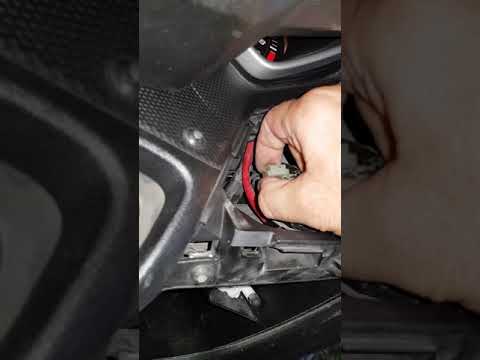
In this tutorial, learn how to turn off the "V-Belt" warning light on the Yamaha X-MAX scooter's instrument panel, a very simple and quick operation. Before doing this, ensure you have completed the required maintenance, specifically replacing the drive belt. Start by inserting the key and turning on the ignition, then open the small right glove compartment and unscrew the screw for the upper cover. Once removed, locate the white connector with a jumper attached, disconnect it, wait about 10 seconds, and reconnect it. If successful, the warning light will disappear. by ScegliAuto More videos
|
|
For advertising on this site Write to info@scegliauto.com
ScegliAuto is not responsible for any inaccuracy of the data in the lists. To report any inaccuracy or your business (if you own the business in question), please write to info@scegliauto.com
Number of seconds to generate the page: 0.006
(c) ScegliAuto 2026 - info@scegliauto.com - Privacy policy VAT number: IT01247470535 |
