
|
Do it yourself
| |||
| ||||


How do you reset the MMI system of the Audi A3?
Model: Audi A3
8V, MK 3
- Years 2012-2019
To completely reset the MMI system installed on the central display of the Audi A3, you will need to insert the ignition key into the corresponding slot and turn it to start the instrument panel. Once the panel has been activated, you can hold down the NAV/MAP and RADIO buttons located on the central console. By keeping these two buttons pressed, you can also hold down the knob for about five seconds; after this interval of time, you will notice that the infotainment system will turn off and immediately restart with the settings reset.
Posted on 6 August 2025 by ScegliAuto
Video tutorial
Related tutorials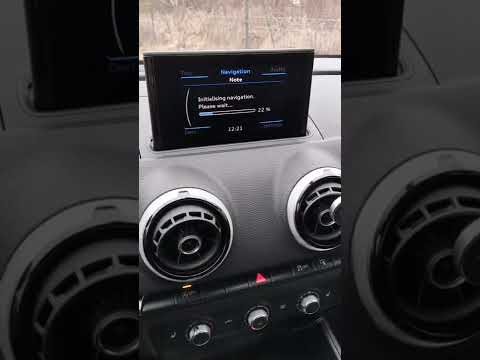
Audi A3
(2020-2026 /
8Y, MK 4)
The Audi MMI (Multi Media Interface) system is a useful and effective system: it simplifies audio controls, vehicle settings, and navigation, all und…

Audi A3
(2012-2019 /
8V, MK 3)
Resetting the MMI is extremely difficult to do on your own, as it requires specialized equipment and knowledge of the system. It is therefore necessa…

Audi A3
(2012-2019 /
8V, MK 3)
In this video, we can see how to restart the MMI system of an Audi A3 8V. The MMI is nothing but the infotainment system (Multi Media Interface), and…
Other guides you may be interested in
|
Frequently Asked QuestionsHow to Bleed the Clutch on a Renault Clio?
To bleed the clutch on a Renault Clio, open the bonnet to access the components located in the engine bay: here, you will need to undo the screws that secure the battery in its housing, the intake manifold, and the coolant reservoir. This will allow you to locate the pipe through which the brake fluid flows: by inserting the other end of the pipe into a container, you can press the clutch pedal to expel all the fluid until it fills the container. by ScegliAuto More videos
|
|
For advertising on this site Write to info@scegliauto.com
ScegliAuto is not responsible for any inaccuracy of the data in the lists. To report any inaccuracy or your business (if you own the business in question), please write to info@scegliauto.com
Number of seconds to generate the page: 0.350
(c) ScegliAuto 2026 - info@scegliauto.com - Privacy policy VAT number: IT01247470535 |
