
|
Do it yourself
| |||
| ||||



Video tutorial
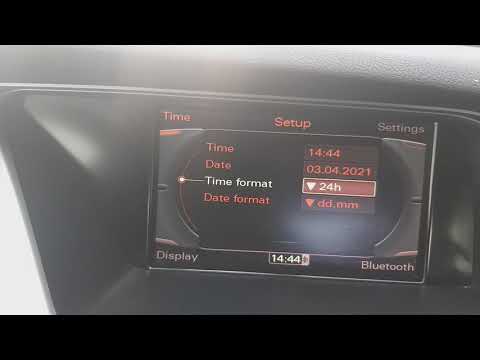
The time setting in the Audi A4 B8 is available in the Settings menu, which can be accessed by viewing the central screen of the dashboard. The steps to reach this option are shown in the video; we need to: turn on the instrument cluster, use the central joystick located behind the automatic gear lever, enter the Menu, scroll through the available options, select Timer, and from there it will be easy to proceed, as everything will be very intuitive. In addition to adjusting the Hours and Minutes, we can also choose the format in which to display the clock and which time zone we prefer.
Posted on 24 November 2025 by ScegliAuto
Related tutorials
Audi A4
(2014-2024 /
B9)
Let's discover how to set the clock on our Audi A4, with the help of the attached video guide. Sometimes, the settings of a car can reset, either due…
Audi A4
(2007-2016 /
B8)
To set the clock on an Audi A4, insert the ignition key to turn on the instrument cluster: then navigate through the menu that appears on the central…

Audi A4
(2004-2008 /
B7)
Follow these instructions to adjust the time on the small display of the Audi A4 instrument cluster. First, get in the vehicle and turn on the instru…
Other guides you may be interested in
|
How to Open the Fuel Filler Flap in the Hyundai i30?
In this tutorial, you will learn how to open the fuel filler flap in the Hyundai i30, a very simple operation that follows the typical procedure of most vehicles. First, unlock the locks using the designated button on the remote, then open the driver's door, locate the release lever on the left side of the seat, and operate it. Next, move to the fuel filler flap, open it completely, unscrew the cap, and refuel as needed. To close the flap, simply press it gently. by ScegliAuto More videos
|
|
For advertising on this site Write to info@scegliauto.com
ScegliAuto is not responsible for any inaccuracy of the data in the lists. To report any inaccuracy or your business (if you own the business in question), please write to info@scegliauto.com
Number of seconds to generate the page: 0.074
(c) ScegliAuto 2026 - info@scegliauto.com - Privacy policy VAT number: IT01247470535 |
